
Prayer Wall
The Prayer Wall is a shared space where members of your church can post prayer requests and pray for one another ("Share requests and pray for one another."). It is the church-wide counterpart to the smaller prayer lists inside individual groups.
Opening the Prayer Wall
- Log in to the Member Portal.
- Click Prayer Wall in the portal navigation (on a phone, the Prayer tab at the bottom).
You will see prayer requests shared with the church, with the most recent at the top. Each request shows:
- The name of the person who shared it, or Anonymous if they posted anonymously
- The request text
- When it was shared
- An I prayed button with the number of prayers so far
- Answered when the request has been answered, sometimes with a Testimony
Sharing a Prayer Request
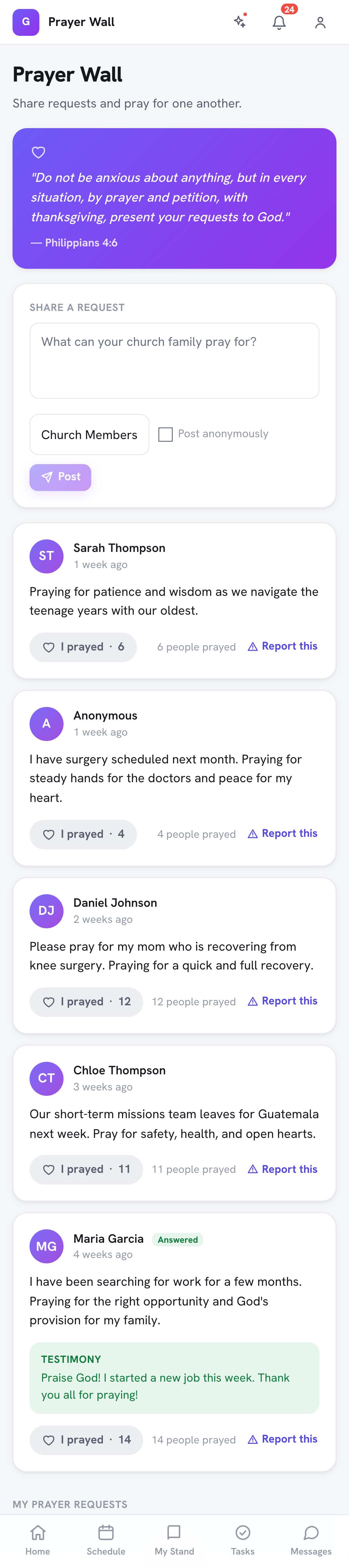
- In the Share a request box, type your request ("What can your church family pray for?"). Be as specific or general as you feel comfortable.
- Choose who can see it:
- Church Members is shown on the Prayer Wall for the church.
- Leaders Only is seen by your church's leaders, not posted on the wall.
- Just Me is kept for yourself.
- Tick Post anonymously if you don't want your name shown.
- Click Post.
You'll see "Your prayer request has been submitted. We are praying with you!" Requests shared with Church Members appear on the wall right away.
Tip: Only signed-in members of your church can see the wall. Prayer requests are not visible on the open internet.
Your Prayer Requests
Everything you've shared is listed under My Prayer Requests, with a Just Me or Leaders label when it isn't on the wall, and Answered once it has been marked answered.
Praying for Others
When you read a request you would like to pray for:
- Click I prayed below the request.
- The count goes up by one and you see "Thank you for praying!"
Each person counts once per request, so the number shows how many people have prayed. This shows the person who shared it how many people are praying, even when no one replies.
Answered Prayers
When a request is answered, your church's staff can mark it Answered and add a Testimony, a short note about how God answered it, so the whole church can celebrate. You can also mark your own request answered yourself (see below).
Reporting a Request
If a request on the wall is inappropriate, click Report this on it and tell your church leaders why. See Reporting Content and Blocking Members.
Group Prayer Requests vs. the Prayer Wall
If you belong to a small group, your group has its own prayer list (see Group Participation). Choose where to post based on how widely you want it shared:
- Prayer Wall is visible to all signed-in church members (when you choose Church Members)
- Group prayer list is visible only to members of that specific group; your group's leaders add requests there
Frequently Asked Questions
Q: Can I edit a prayer request after I submit it? A: Not from the portal. If you need to update or remove one, contact your church office.
Q: Who can post on the Prayer Wall? A: Any signed-in member of your church.
Q: Are visitors or non-members able to see prayer requests? A: No. The Prayer Wall is for signed-in members only.
Withdrawing or Answering Your Own Request
On your own request you can choose Mark answered, or Withdraw request. Withdrawing asks you to confirm and removes the request from the prayer wall. (8.205.303)
Last updated: 2026-10-21 (8.205.306).