
Reviewing Reported Content
Members can report a message, an announcement comment or a prayer request in the Member Portal when something crosses a line (see Reporting Content and Blocking Members). Every report lands on the Reported content page, where a church administrator decides what happens to it.
Audience: This article is for church administrators. Only church administrators can see the Reported content page and act on reports. Anyone else who opens it sees "Only church administrators can review reported content."
When a Report Comes In
Each church administrator gets a Content reported notification: "A member reported content (Message: Harassment or bullying). Please review it." Click Review reports to go straight to the queue. The notification appears in TimelyChurch, and it is also emailed to administrators who have email notifications turned on.
For the member who reported it, the item is hidden from their own view straight away, whatever you decide later. Everyone else keeps seeing it until you remove it.
Opening the Queue
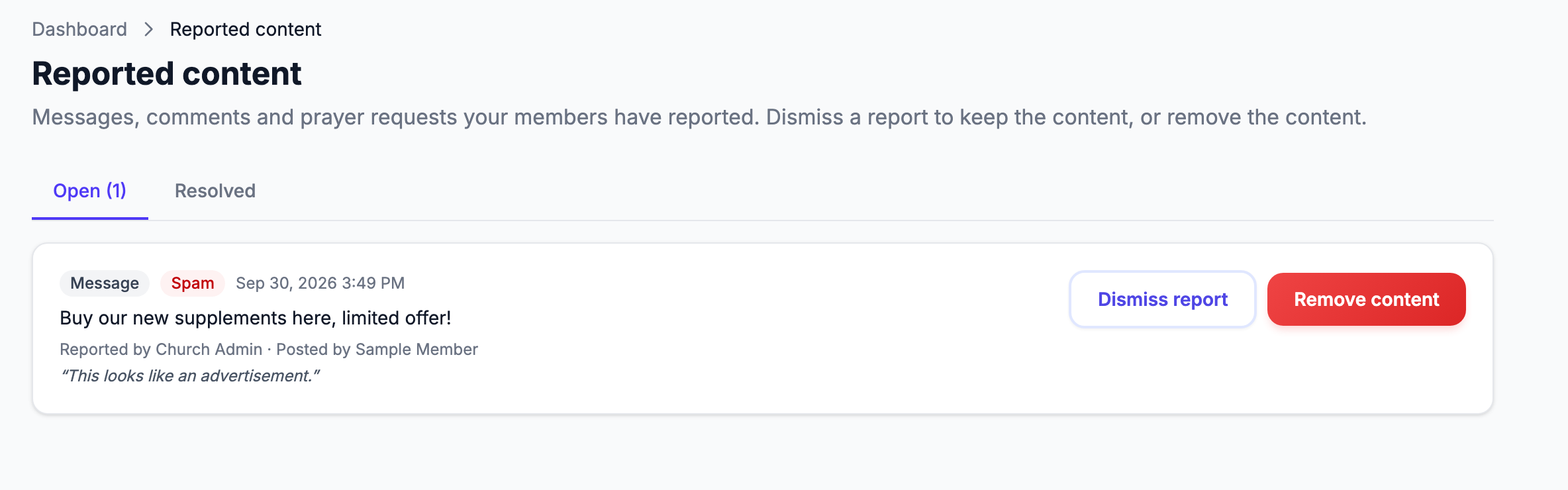
Click Reported content in the sidebar, under Communications (on a phone, it's in the menu too). The page says: "Messages, comments and prayer requests your members have reported. Dismiss a report to keep the content, or remove the content."
It has two tabs:
- Open (with the number waiting) -- reports that still need a decision. When there are none: "No open reports. Nice and quiet."
- Resolved -- reports you or another administrator have already handled, marked Dismissed or Removed.
Each report shows:
- what kind of content it is (Message, Announcement comment or Prayer request) and the reason the member chose (Spam, Harassment or bullying, Inappropriate content or Something else);
- when it was reported;
- the text of the content;
- Reported by and Posted by;
- the member's note, if they added one.
Deciding What to Do
For each open report, choose one:
- Dismiss report -- the content stays as it is. Use this when the content is fine or the report was a misunderstanding. The report moves to Resolved as Dismissed.
- Remove content -- takes the content away for everyone. Confirm "Remove this content for everyone?". What "removed" means depends on the kind of content:
- a message is deleted from the conversation;
- an announcement comment is hidden, the same as hiding a comment yourself;
- a prayer request is taken off the Prayer Wall.
Removing content also closes every other open report about the same item, so you only handle it once.
Neither choice notifies the member who reported it or the member who posted it. If the situation calls for a conversation, reach out to them yourself.
Tip: A report is a starting point, not a verdict. Read the whole conversation or comment thread before deciding, and involve your pastoral team for anything about someone's safety.
Related Articles
- Reporting Content and Blocking Members -- what members see
- Messaging
- Announcements
- Notifications