
Fill Requests: Offer Open Spots, First to Claim Wins
A Fill Request is how a leader fills open serving spots by ASKING, not assigning. Think of the classic case: Sunday has two preaching slots and five people who could take them. Instead of guessing who is free, you send one request to all five. Each gets a personal claim link. The first two who tap it are scheduled; the other three get a kind "it's filled — thank you." Nobody is chased, nobody is guilt-assigned, and the leader watches the spots fill themselves.
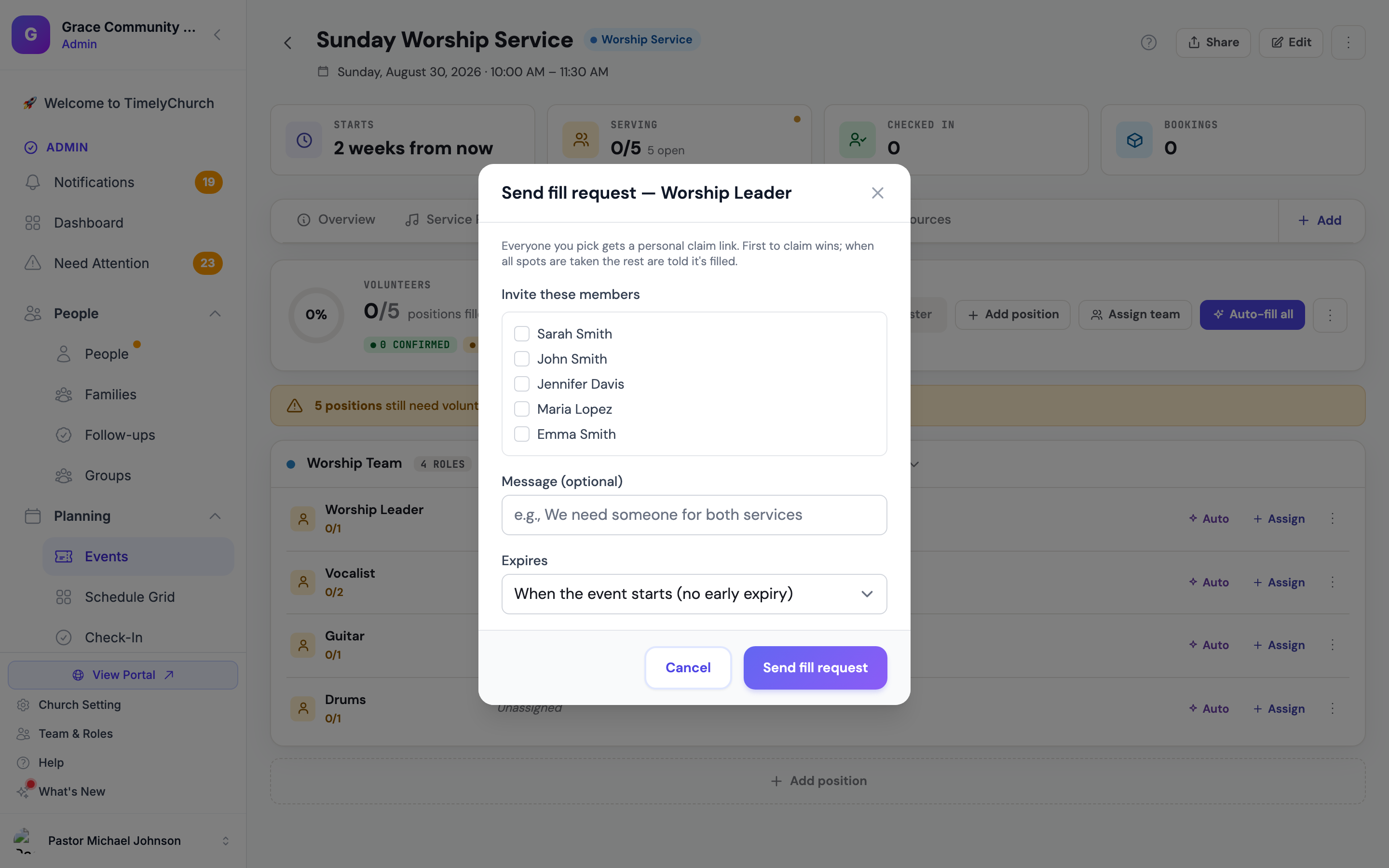
Sending a Fill Request
- Open the event and go to its Serving tab.
- On the position with open spots, open its Edit position menu (⋯) and choose Send fill request.
- Under Invite these members, pick the team members to invite (any number — only active members of the position's team are listed).
- Optionally add a Message (optional) ("We need someone for both services") and choose when it Expires: After 1 day, After 2 days, After 3 days, After 1 week, or When the event starts (no early expiry).
- Click Send fill request.
Everyone you picked is notified immediately — on Telegram if their account is linked, by email otherwise. On Telegram it's a one-tap ✋ I can take it button right in the chat; by email it's that person's own secure claim link.
One at a time: a position can only have one OPEN fill request. The position menu shows Cancel fill request (N invited) while one is out; cancel it to send a fresh one.
What Invitees Experience
- The message says what the spot is, when the event is, and that the first to claim gets it.
- Tapping I can take it claims the spot instantly — in Telegram the button answers in the chat, and by email no login is needed because the link is personal and secure. They land on a confirmation page and the assignment appears in their portal schedule as Confirmed.
- If the spot was taken moments earlier, they see a friendly "all spots are filled" page instead — no double-bookings, ever. The claim is protected against two people tapping at the same second; exactly as many claims succeed as there are open spots.
- Claim links are personal. A forwarded link cannot be used to claim for somebody else.
When the Last Spot Fills
- The request closes itself.
- Everyone who didn't get a spot receives a warm "it's filled — thank you" notice, so nobody shows up Sunday thinking they were needed.
- The team's leaders get a message with who took the final spot.
If Nobody Claims
If you set an expiry and it passes unclaimed, the request closes and the team leaders are notified that the spot is still open — on the morning it expires, not on Sunday. From there you can send a new fill request to different people, assign someone directly, or let the auto-scheduler pick.
Fill Requests vs. the Other Filling Tools
| Tool | Best when |
|---|---|
| Auto-fill / cascade | You are happy with rotation picking the person. |
| Open for sign-ups | Anyone on the team may take it, and you don't need to nudge anyone. |
| Fill request | You want to ask SPECIFIC people, give them a fair race, and be done the moment someone says yes. |
| Assign / Re-invite | You already know the one person you want. |
Related Articles
- Cascade Auto-Fill, Sub Invites, and Out-of-Office Badges — how declines and silence cascade automatically.
- Scheduling Volunteers for Events — assignment statuses, including Expired.
- Automation and Scheduled Jobs — the daily follow-up that closes expired requests and re-pings the unconfirmed.