
Song Sync — The App That Keeps Your Media Computer Ready for Sunday
Every week someone exports Sunday's songs one file at a time and copies them onto the computer that runs the slides. Then the set changes on Thursday, and it all has to be done again. Song Sync is a small desktop app for Mac and Windows that does that job for you.
Install it on the computer that runs your slides or your livestream and pair it with your church once. From then on it keeps one folder on that computer filled with the songs on your upcoming setlists: one folder per service date, every song numbered in play order, each in the arrangement and key the setlist calls for, in the file format you choose. When a setlist changes, Song Sync rewrites that date's folder at its next sync.
Note: the Mac and Windows versions are different right now. The Mac download is version 1.0.4. The Windows download is version 1.0.2, which does not have the Translations card or Log out yet. The sections that apply only to the Mac say so.
What Song Sync Does, and What It Doesn't
- It delivers files into a folder on the computer. You, or your presentation software, open them from there.
- It exports in five formats: ProPresenter (.pro), PowerPoint (.pptx), PDF (.pdf), Slide Images (.zip of .png) and Plain Text (.txt).
- It does not open, control or import into any other program, and it isn't a live connection. Files change only when Song Sync syncs.
- The app's own screens are in English.
Who Can Use It
| Plan | What you see |
|---|---|
| Pro | Everything in this article. |
| Growth | The Song Sync tab, the download buttons and Create Song Sync code all appear, but a computer can't pair. The app shows "Song Sync is a Pro feature. Upgrade to keep syncing." |
| Starter | Songs and setlists aren't part of the plan. Song Library shows a lock in the menu, and there is no Setlists or Devices page. |
Creating or replacing the code and revoking computers needs a role whose Songs permission includes Edit (church administrators have it). Worship team leaders who manage songs only through their own team can't create a code.
Where to Find It
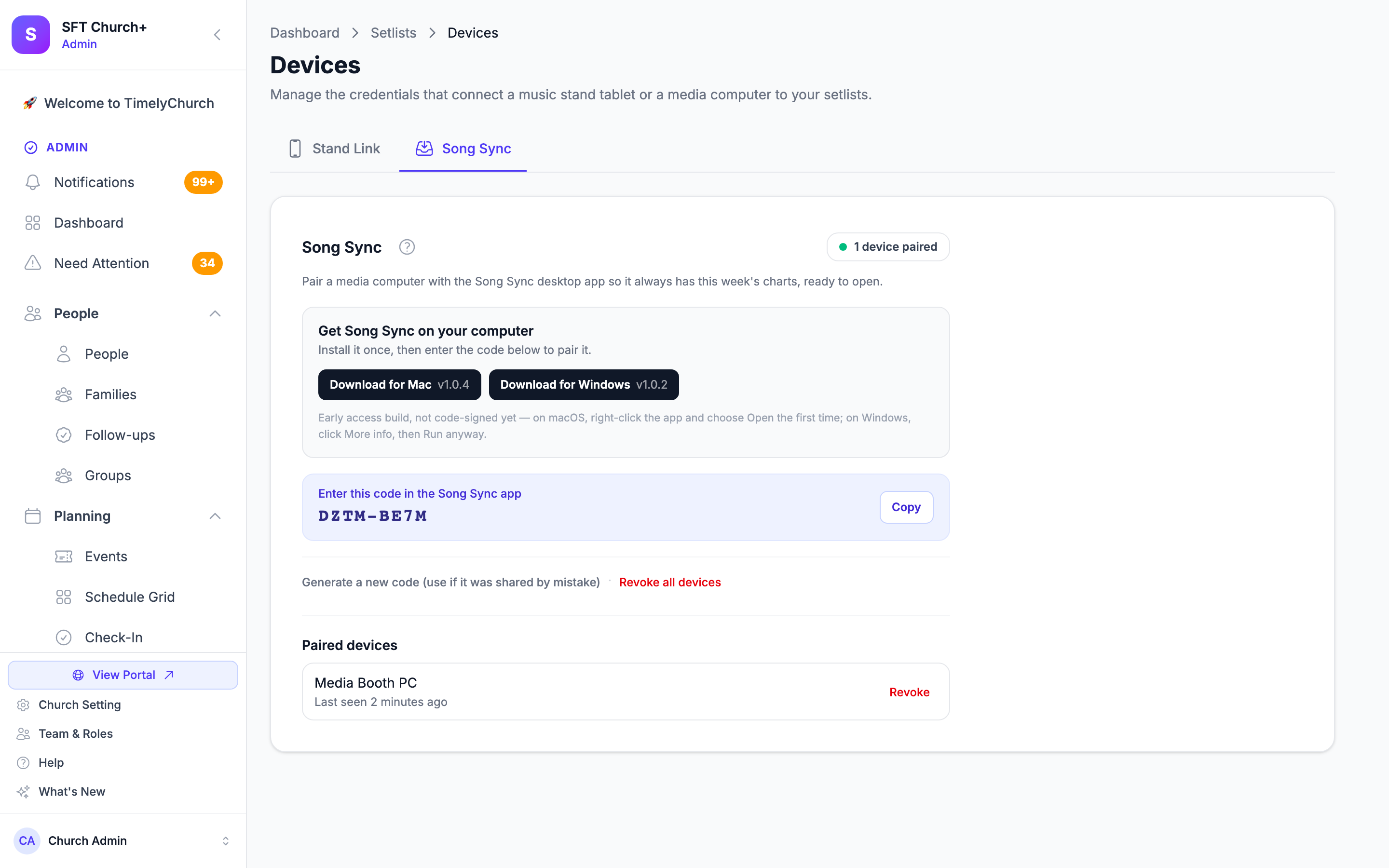
In the admin area, go to Worship → Setlists and click Devices (next to Add Setlist). On the Devices page, open the Song Sync tab. The small dot on the Devices button turns green once a computer is paired (or once Stand Link is set up).
Step 1: Install Song Sync
Both download buttons are on the Song Sync tab, in the Get Song Sync on your computer card. The version number is printed on each button.
| Mac | Windows | |
|---|---|---|
| Button | Download for Mac | Download for Windows |
| Version today | 1.0.4 | 1.0.2 |
| Computer | A Mac with Apple silicon (M1 or newer), macOS 11 or later. Intel-based Macs aren't supported. | A 64-bit Intel or AMD (x64) PC |
On a Mac
- Click Download for Mac.
- In your Downloads folder, double-click the file you downloaded if it hasn't been unpacked already, then drag the Song Sync by TimelyChurch app into your Applications folder.
- Open it from Applications.
The Mac app is signed and notarized by Apple, so it opens like any other app. There's no need to right-click it. macOS may ask you once to confirm that you want to open an app downloaded from the internet; click Open.
On Windows
- Click Download for Windows, then run the setup file you downloaded.
- The Windows version isn't code-signed yet, so Windows may show a Windows protected your PC screen the first time. Click More info, then Run anyway.
- Song Sync installs for your own Windows user account. No administrator password is needed.
Step 2: Pair the Computer
- On the Song Sync tab, click Create Song Sync code. You'll see "Song Sync code created. Enter it in the desktop app to pair a computer." The code appears under Enter this code in the Song Sync app as two groups of four characters, such as
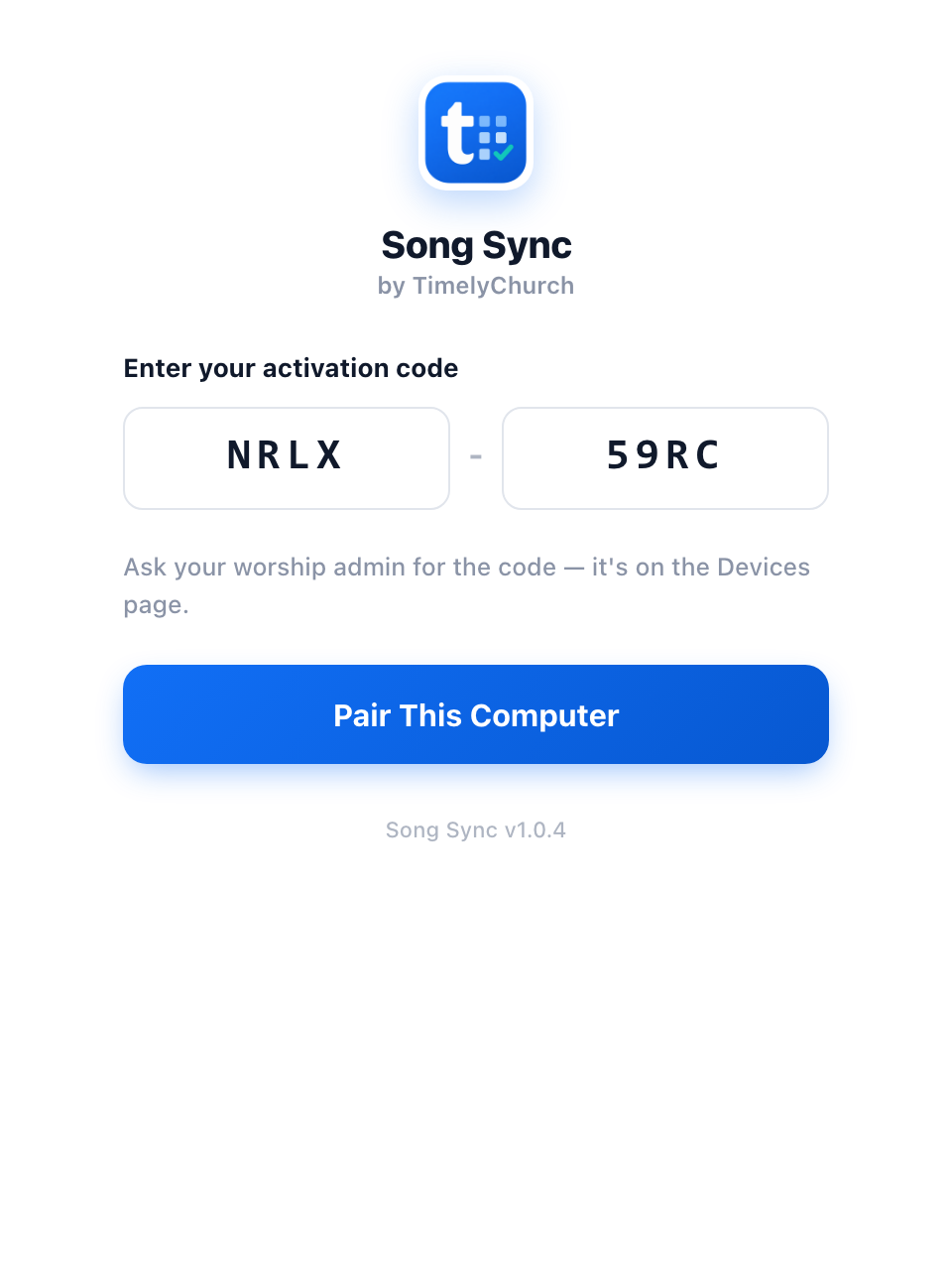
NRLX-59RC. Click Copy to copy it. (Codes never use 0, O, 1 or I, so they're easy to read aloud.) - On the media computer, Song Sync opens on Enter your activation code. Type the code into the two boxes, or paste it; pasting the whole code fills both boxes.
- Click Pair This Computer. You'll see You're connected! with your church's name, and then the main window.
There's no login, email or password on that computer. The code is all it needs. The computer then appears under Paired devices on the Song Sync tab, listed by its computer name.
If Pairing Doesn't Work
| Message in the app | What it means |
|---|---|
| "That code is invalid or has expired. Ask your worship admin for a new one on the Devices page." | The code was mistyped, or it has been replaced with a new one. Copy the current code from the Song Sync tab. |
| "This account has reached its computer limit." | Two computers are already paired. Revoke one under Paired devices, then try again. |
| "Song Sync is a Pro feature. Upgrade to keep syncing." | Your church's plan doesn't include Song Sync. |
| "Song Sync requires a plan that includes Songs & Music." | Your church's plan doesn't include Songs. |
| "Your subscription is not active. Song Sync is paused until it is restored." | Your church's subscription has lapsed. |
| "Can't reach TimelyChurch. Check your internet connection and try again." | The computer couldn't connect. Check its internet connection. |
Two Computers per Church
Up to two computers can be paired at the same time, for example the projection computer and a livestream or backup computer. Both use the same code. To pair a third computer, revoke one of the others first.
If the code was ever shared by mistake, click Generate a new code (use if it was shared by mistake). As the confirmation says: "Create a new code? The old one will stop working, but computers already paired keep syncing."
Step 3: Choose a Folder, a Format and a Schedule
Pairing alone doesn't put any files on the computer. Right after pairing, the Sync Folder row reads "No folder chosen yet", and Sync Now stays greyed out until you choose one.
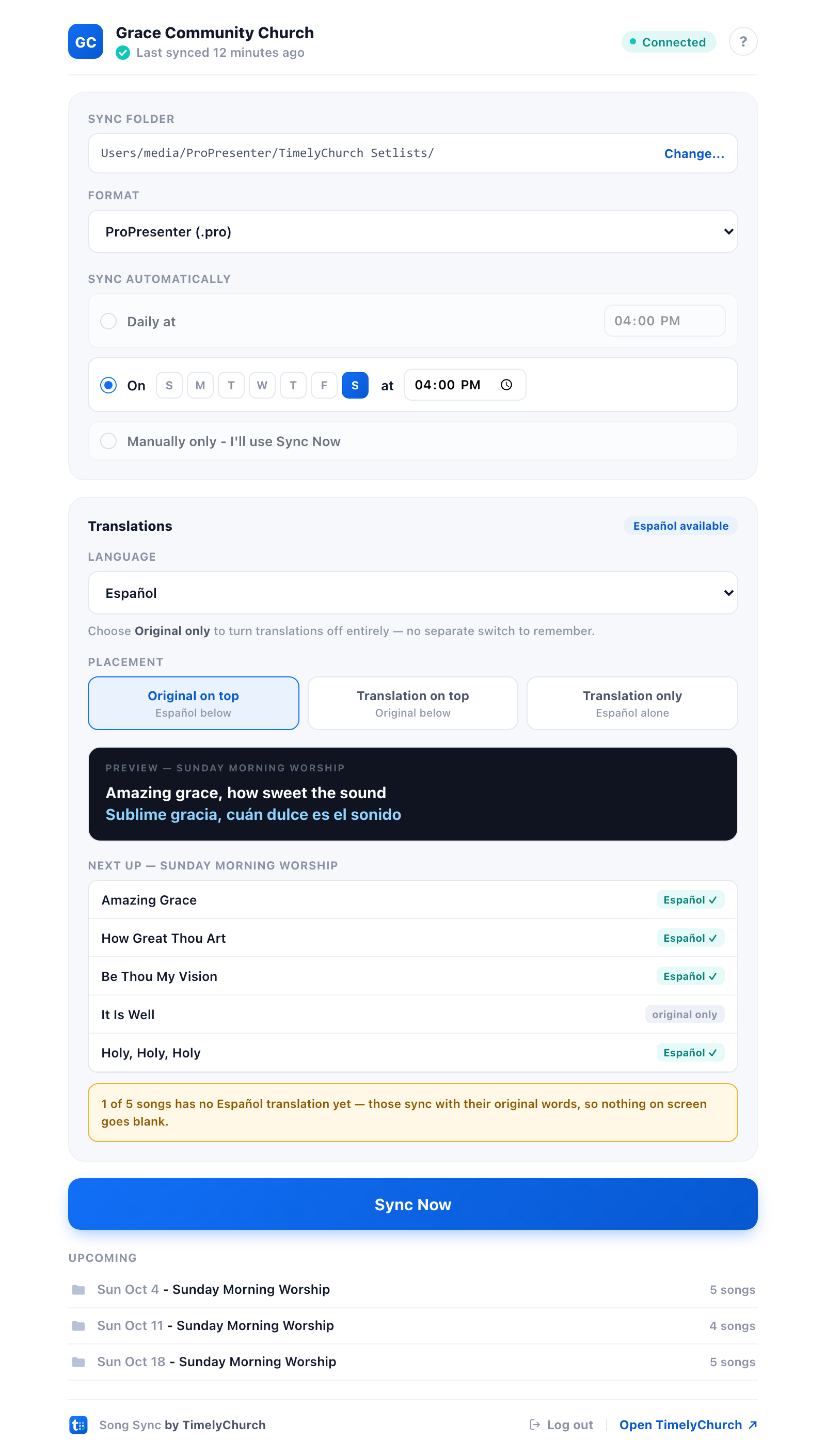
- Sync Folder: click Choose... and pick where the files should go. (Once a folder is set, the link reads Change....) A folder your presentation software already uses is a good choice.
- Format: choose ProPresenter (.pro), PowerPoint (.pptx), PDF (.pdf), Slide Images (.zip of .png) or Plain Text (.txt). ProPresenter is selected to start with.
- Sync automatically: choose one of these.
- Daily at a time you pick. This is the starting setting, at 4:00 PM.
- On one day of the week at a time you pick. Click a single day letter (S M T W T F S). Each computer syncs on one day of the week, not several.
- Manually only - I'll use Sync Now.
- Click Sync Now for the first sync. The Upcoming list shows each setlist Song Sync found, with its date and number of songs.
About the scheduled time. Each computer adds its own delay of 0 to 59 minutes to the time you choose, so a 4:00 PM sync runs at some point between 4:00 and 4:59 PM. Choose a time at least an hour before you need the files.
How the slides look. Song Sync draws the slides with your church's saved default look -- the sizes, spacing, colours and lines per slide saved with Save as church default in the slide preview. To change how synced slides look, change and save that default. See Previewing and Exporting Congregation Slides.
There's deliberately no "every few minutes" option. Setlists change a handful of times a week, so a daily or weekly sync catches every change, and Sync Now is there for a last-minute edit.
Click the round ? at the top of the main window any time for How Song Sync works, a short built-in guide.
Translations (Mac, Version 1.0.4)
If your songs have published translations, each computer can bring a translation into its slides.
The Translations card appears only when at least one song on an upcoming setlist has a published translation.
- Language: choose a language. Languages are listed in their own names, such as Español or Русский. Choose Original only to turn translations off entirely.
- Placement: choose Original on top, Translation on top or Translation only. These are greyed out while Original only is selected.
- Preview: the dark box shows one line from the setlist listed under Next up (below), taken from the first of its songs that has the chosen language, in the placement you picked.
- Next up: every song on the earliest setlist Song Sync is syncing is listed with a tag, either the language with a check mark or "original only". That's normally your next service, but for up to two days after a service it's the one just past. A note underneath tells you how many songs are missing that language, for example: "2 of 5 songs have no Español translation yet — those sync with their original words, so nothing on screen goes blank."
- Click Sync Now. Changing the language or placement makes the next sync export every setlist again.
Good to know:
- It's a per-computer choice. The projection computer can sync Spanish while the livestream computer stays on Original only.
- Only published translations sync. A translation still marked as a draft never goes to Song Sync, even though you can export a draft by hand from the slide preview.
- On Windows (version 1.0.2) there's no Translations card yet, so a Windows computer syncs every song with its original words.
What Lands in the Folder
Inside your sync folder, Song Sync creates one folder per setlist, named with the service date. Each song is one file, numbered in play order:
Your sync folder
└── 2026-10-04
    ├── 01 - Amazing Grace.pro
    ├── 02 - Be Thou My Vision.pro
└── 03 - Holy, Holy, Holy.pro- A setlist without a date uses the setlist's name for its folder instead.
- Each song is exported in the arrangement and key chosen on that setlist.
- With Slide Images (.zip of .png), each song is one .zip file that contains that song's slide images.
Which setlists sync. Setlists dated from two days ago up to your church's look-ahead window, plus setlists without a date. The window is the same one Stand Link uses: 3 weeks unless you change it. Once Stand Link is set up, you can change it on the Stand Link tab with Show setlists up to (from 1 week ahead to 6 months ahead). A setlist with no songs is skipped. Every paired computer receives every setlist in the window; Song Sync doesn't choose setlists by team, room or campus.
When a setlist changes. A song added, removed or moved, a key or arrangement changed, a chart or a song title edited, or a published translation updated: at the next sync, Song Sync deletes that date's folder and writes it again from scratch, so a song taken out of the set never lingers. You'll see a notification such as "Setlist updated".
Don't keep your own files in a synced date folder. Anything saved inside a date folder, such as an edited presentation or an extra video, is deleted the next time that setlist changes. Save edited copies somewhere outside your sync folder.
A few more things to know:
- Two setlists on the same date share one date folder, so the one that synced most recently replaces the other.
- Folders for past services stay where they are. Song Sync never deletes them, so tidy them up whenever you like.
- Changing the Format, Language or Placement makes the next sync export everything again in the new choice. Click Sync Now to do it straight away.
- When TimelyChurch improves how charts and slides are drawn, every paired computer downloads its upcoming setlists again once, at its next sync, so the files in your folder match the new look. That one sync may take longer than usual; nothing else changes.
- Pointing Song Sync at a different folder doesn't copy what's already been synced; each setlist arrives in the new folder the next time it changes. The same goes for a date folder you delete yourself. To fill the folder straight away, choose a different Format, then your usual one again, and click Sync Now.
- Just edited a setlist? The new files can take a minute or two to prepare, and Song Sync waits for them. If they still aren't ready after about four minutes, that setlist is picked up at the next sync.
Song Sync Lives in Your Menu Bar or System Tray
Song Sync is meant to keep running in the background.
- Mac: the Song Sync icon sits in the menu bar at the top of the screen, near the clock. Song Sync doesn't appear in the Dock.
- Windows: the icon sits in the system tray, near the clock. If you don't see it, click the small arrow (^) beside the tray icons.
Click the icon to open its menu:
| Menu item | What it does |
|---|---|
| Status line: Up to date, Not synced yet, Syncing (with the setlist name), Sync paused, Can't reach server or Needs re-pairing | Shows where things stand |
| ⬆ Update Available — v… | Appears only when an update is waiting. Opens About Song Sync. |
| Sync Now | Syncs right away |
| Open Folder | Opens your sync folder |
| Settings… | Opens the main window |
| About Song Sync… | Version number, updates and a help link |
| Log out of your church… | Mac, version 1.0.4 only. See Log Out or Switch Churches. |
| Quit Song Sync | Stops Song Sync completely |
Closing the window isn't quitting. Closing the window only hides it. On a Mac that includes the red close button, ⌘W and even ⌘Q; on Windows, closing the window hides it to the tray. Song Sync keeps running and keeps syncing. Only Quit Song Sync in the menu stops it.
After a restart, open Song Sync once. Song Sync doesn't start by itself when the computer starts up or restarts. Until someone opens it, nothing syncs. Open it from Applications (Mac) or the Start menu (Windows); it syncs as soon as it opens and then stays in the menu bar or tray.
Song Sync also shows a notification when:
- a new setlist arrives: "Sunday, Oct 4 is ready" / "5 songs exported to your folder."
- a setlist is updated: "Setlist updated" / "5 songs re-exported for Sunday, Oct 4."
- syncing is paused: "Sync paused" / "Check Song Sync for details."
- the computer needs pairing again: "Song Sync needs re-pairing"
- an update is ready: "Update available"
Status Messages in the Main Window
| What you see | What it means | What to do |
|---|---|---|
| Connected and "Last synced 10 minutes ago" | All is well. | Nothing. |
| Syncing... with the setlist name and "2 of 3" | A sync is running. | Wait a moment. |
| Retrying... and "Can't reach TimelyChurch — retrying automatically." | Song Sync couldn't connect. The files already in your folder are untouched. | Check the internet connection, then click Sync Now. |
| Paused with a plan or subscription message | See When a Plan Lapses. | |
| Needs re-pairing and "This computer's connection was removed. Enter a new activation code to reconnect." | The computer was revoked on the Devices page. | Click Re-Pair This Computer and enter the current code. |
| "This folder can't be found." | The sync folder was moved, renamed or deleted, or its drive is disconnected. | Click Choose New Folder..., then see What Lands in the Folder to fill it straight away. |
| "Nothing in the sync window yet." | No setlist falls inside the look-ahead window. | Check the setlists' dates. |
Missed and Offline Syncs
- The computer was asleep at the scheduled time: Song Sync syncs within a minute or so of waking, as long as it's still the same day.
- Song Sync wasn't running, for example because the computer was off: it syncs as soon as it's opened.
- The internet was down at the scheduled time: Song Sync tries again at the next scheduled sync, the next time it opens, or when you click Sync Now. If the connection comes back before the service, click Sync Now.
When a Plan Lapses
If your church's subscription lapses, or its plan no longer includes Song Sync, syncing pauses. The main window shows Paused with one of these messages:
- "Your subscription is not active. Song Sync is paused until it is restored."
- "Song Sync is a Pro feature. Upgrade to keep syncing."
- "Song Sync requires a plan that includes Songs & Music."
The menu shows Sync paused, and one "Sync paused" notification appears. Nothing already in the folder is removed or changed. While syncing is paused, the Sync Now button in the window is greyed out.
Once the subscription or plan is sorted out, Song Sync resumes on its own at its next sync (the scheduled time, or the next time it opens). To check straight away, choose Sync Now from the menu-bar or tray menu.
Log Out or Switch Churches (Mac, Version 1.0.4)
Useful on a shared or borrowed computer that needs to sync for a different church.
- Click Log out at the bottom of the main window, or choose Log out of your church… from the menu.
- Song Sync asks "Log out of your church?" and explains: "This computer will stop syncing and return to the pairing screen, so you can connect a different church. Your already-synced files stay on this computer."
- Click Log out (or Cancel).
Song Sync returns to the pairing screen, ready for another church's code. Your folder, format and schedule settings are kept.
Logging out doesn't free the computer's slot. The computer is still listed under Paired devices and still counts toward the two-computer limit. If it won't be coming back, click Revoke next to it on the Devices page.
On Windows (version 1.0.2) there's no Log out yet. To move a Windows computer to a different church, ask the current church to revoke it under Paired devices. At its next sync (choose Sync Now from the tray menu to check straight away), Song Sync shows Needs re-pairing. Click Re-Pair This Computer and enter the new church's code.
Updates
Song Sync checks for updates shortly after it opens and then once a day. It never installs an update without asking.
- When an update is available, the menu shows ⬆ Update Available — v… and one "Update available" notification appears.
- Click that menu line (or About Song Sync…). The About window says "Song Sync version is available." Click Install Now, or Later.
- When the download finishes: "Song Sync version is ready." Click Restart Now, or Later.
An update never interrupts a sync: if one is running, the button reads "Waiting for sync…" for a short while. If the sync is still going when the button returns, click it again in a moment. Check for Updates in the About window checks on demand; "You're up to date" means you already have the latest version. The About window also has Help: Setting up Song Sync, which opens this article.
The Windows version is 1.0.2 today. When a newer Windows version is published, it arrives the same way.
Managing Paired Computers
Everything is on the Song Sync tab of the Devices page:
- Paired devices lists each computer by its name (or "Unlabelled device"), with "Last seen …" or "Never checked in yet". The badge at the top reads, for example, "1 device paired".
- Revoke removes one computer: "Revoke this device? It stops syncing the next time it checks in."
- Revoke all devices removes every paired computer at once.
- Generate a new code (use if it was shared by mistake) replaces the code. Computers already paired keep syncing.
Files already on a revoked computer stay there.
Related Articles
- A Week with Song Sync for Your Media Team — Song Sync in a real week, plus a before-Sunday checklist
- Stand Link — The Tablet That Lives on the Music Stand — the same Devices page, and the look-ahead window Song Sync uses
- Adding a Translation to a Song — writing and publishing the translations Song Sync can deliver
- Previewing and Exporting Congregation Slides — exporting one song or setlist yourself
- Building Setlists — getting a set onto the calendar in the first place