
Choosing Your Language
TimelyChurch works in English, Español, Русский, Português, Deutsch, and Lietuvių, six languages and counting. Every screen a church admin, team member, or family uses can run in any of them.
Language Is Per Person
Unlike your time zone or your church's name, language is set per person, not per church. Your English-speaking administrator and your Spanish-speaking worship leader can share the same church account, each seeing every screen in their own language. No separate logins, no separate setups.
Switching Your Language
- Click your name or photo at the bottom of the sidebar to open the account menu.
- Under Language, pick from the dropdown: English, Español, Русский, Português, Deutsch, or Lietuvių.
- The page reloads instantly in your chosen language. Everything switches over: people, check-in, events, volunteers, groups, giving, announcements.
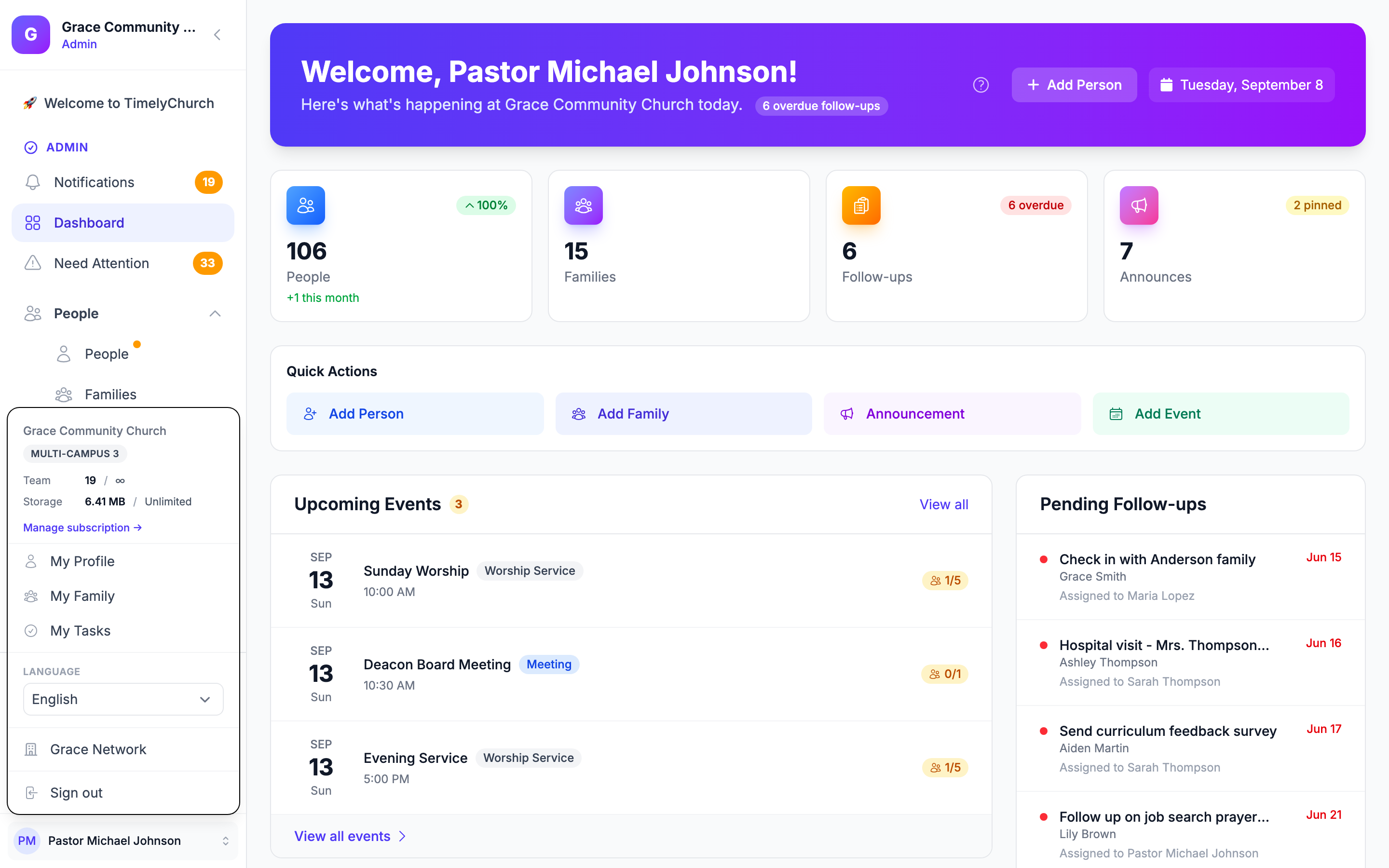
You can switch back and forth as often as you like. It only affects what you see, never what anyone else on your team sees.
You can also change it on your My Profile page, under Language → Display language ("Choose the language used across your portal."). This is the place for members, who use the member portal rather than the admin sidebar.
Your Church's Default Language
Church Settings also has a Default language setting (Church Setting at the bottom of the sidebar → Profile → Location & Details). This is the language shown to a team member who hasn't picked a personal preference yet, for example someone invited but who hasn't opened the account menu. Once a person chooses their own language, their personal choice always wins over the church default.
When your church is created, the default language is set from the Country you chose. If you later change the country and haven't picked a different default language yourself, the default language follows the new country.
A Language-Ready Sign-Up Link
If you're inviting someone brand new, someone who doesn't have an account yet, a sign-up link can open already in their language. Share a link like timelychurch.com/register?lang=lt and the very first screen a new Lithuanian-speaking visitor sees, including the "join my church" / "start a new church" question, is already in Lietuvių. This is meant for the sign-up and find-my-church pages a brand-new visitor lands on before they have an account; once someone is logged in, their own account language (set from the menu above) takes over.
Visitors on your public website and forms
When your church offers more than one language (for example a public form also published in Russian), your public website shows a small language menu (it shows the current language) under the footer, and each public form shows it under "Powered by". A visitor picks a language there and it stays as they move between pages. This works on both the classic website and Website Studio. A church with only one language sees no menu.
The Knowledge Base, Too
This Knowledge Base is available in English, Español, Русский, Português, Deutsch, and Lietuvių, so your team can search and read help articles in the language they're most comfortable with.
Related Articles
- Church Settings: the church-wide Default language setting and other profile fields.
- Navigating the Admin Panel: the account menu and sidebar in general.
Verified against TimelyChurch 8.205.308 on 2026-10-22.