
Association HQ Overview
Audience: Association administrators (denomination/network leaders managing multiple churches).
Association HQ is TimelyChurch's umbrella module for organizations that oversee multiple churches — denominations, church networks, mission boards, and similar bodies. From a single dashboard, an association admin can invite member churches, view aggregate reports, and manage shared HQ settings. Association HQ is part of the Multi-Campus plan.
The plan is checked on your association's primary church — the church that holds the Multi-Campus subscription. If that church's plan does not include Association HQ, the HQ pages show "Association HQ is not available on your current plan. Contact TimelyChurch to upgrade to Multi-Campus."
Who this is for
Association admins typically represent:
- Denominations with member churches reporting up.
- Church networks sharing branding, training, or administrative resources.
- Mission boards tracking partner churches.
- Multi-site umbrellas with autonomous campuses.
If you are a single-church admin, this section does not apply to you — see the Settings & Admin category instead. If your church has been invited to join an association, see Joining an Association (for Member Churches).
Where to find it
Association HQ has its own address, separate from any one church's admin panel. If you belong to an association's HQ team and have no access to a church's admin panel, signing in takes you straight to Association HQ. If you also work in a church's admin panel, you land there first; the sidebar (and the account menu) shows a link with your association's name — click it to open Association HQ.
Association HQ has its own top navigation bar with Dashboard, Churches, Reports, and — for admins — Settings. The account menu in the top-right corner (your name) also includes a Back to Church Admin link if you also manage a church, so you can switch between the two surfaces, and Sign Out.
Member churches retain full control of their own data; association admins see aggregated views and reports.
Key workflows
The association module includes:
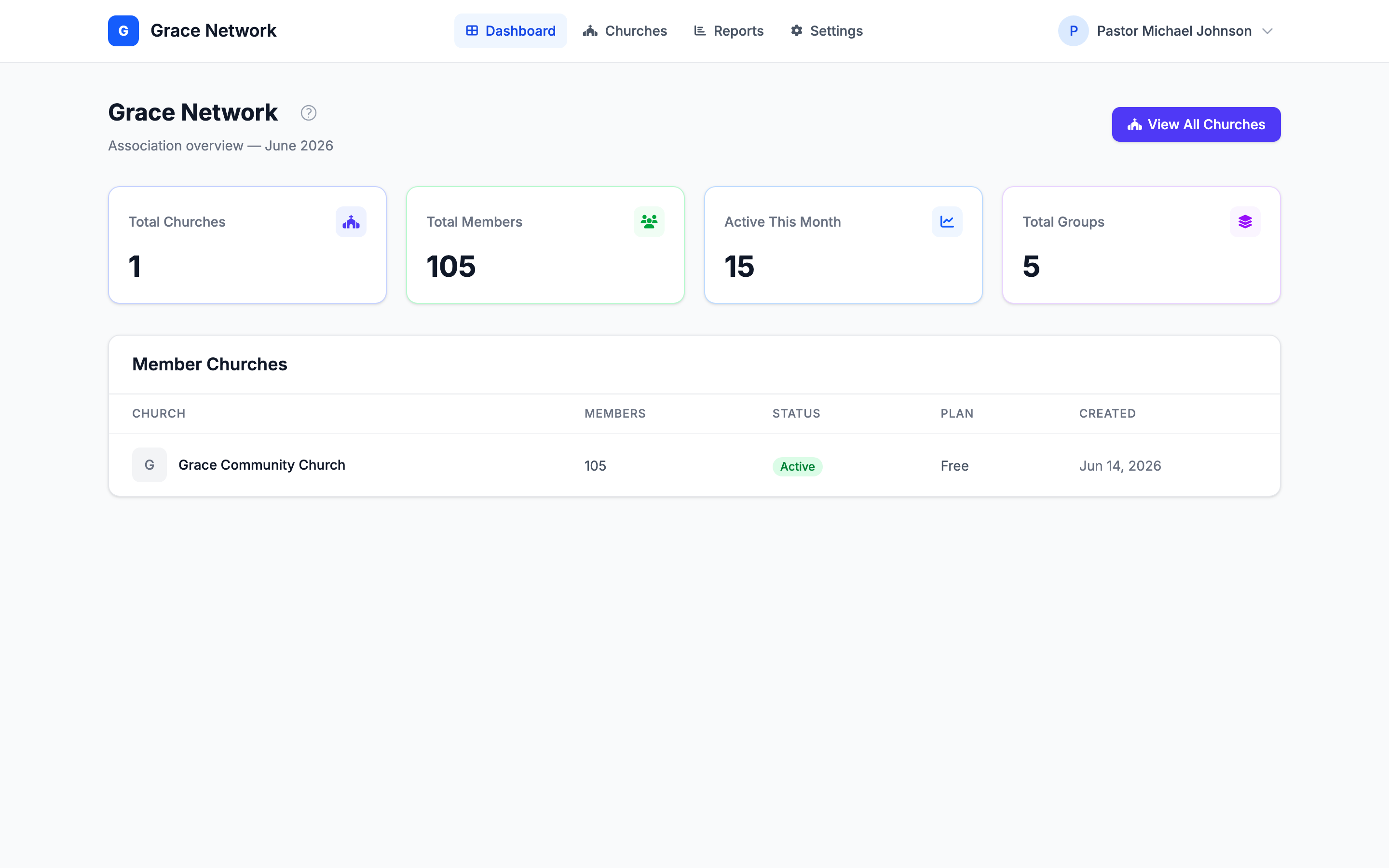
- Dashboard — four metric cards across all member churches: Total Churches, Total Members, Active This Month, and Total Groups, followed by the Member Churches table. Click a church's name in the table to open its details. Active This Month counts the people with at least one check-in marked present this month (each church's own calendar month), added up across your churches. View All Churches in the header opens the Churches page.
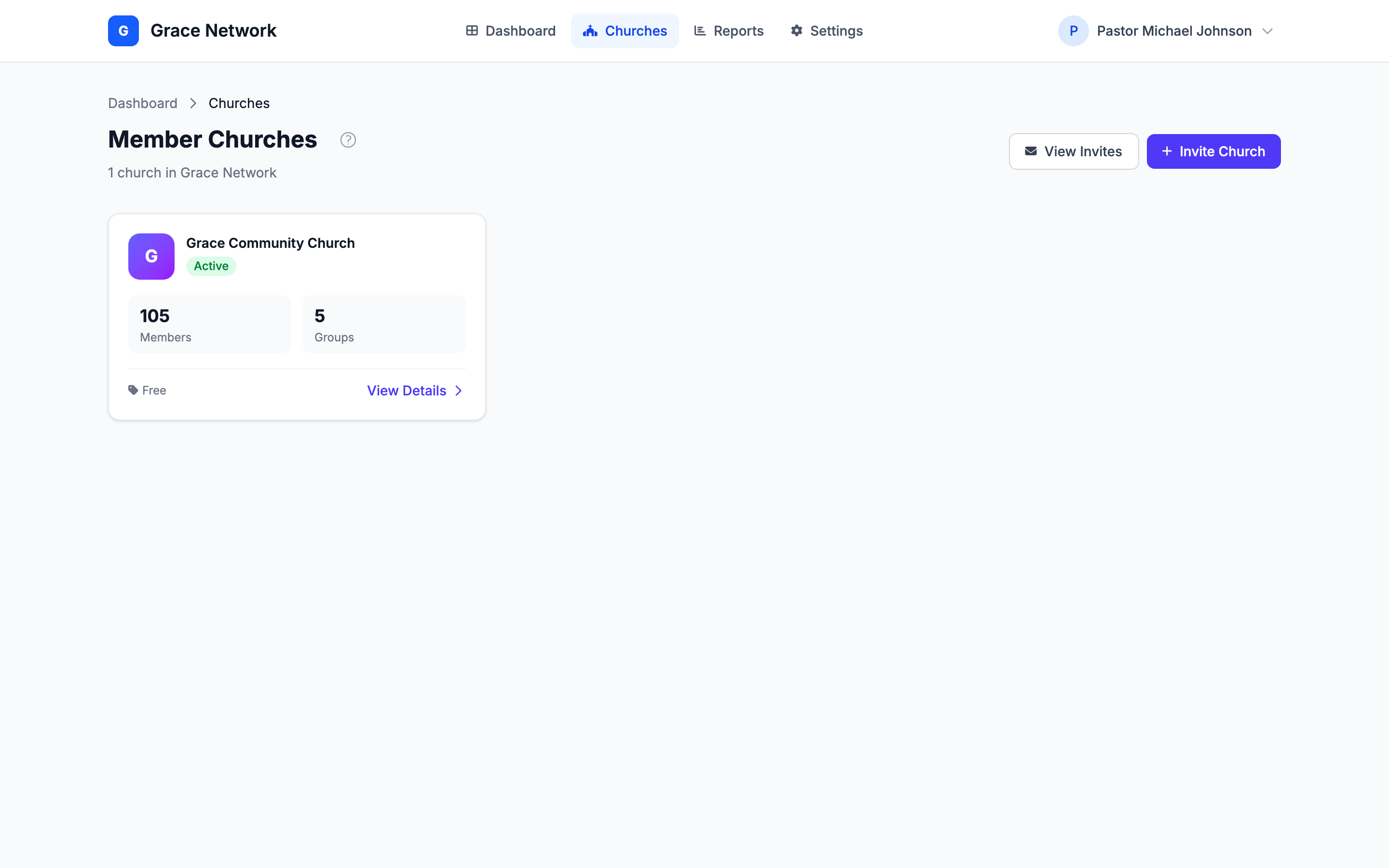
- Churches — the Member Churches page: a card for each church with its Members and Groups counts and a View Details link into a read-only detail view (see Church detail view below).
- Reports — Association Reports: this month's Total Members, Attendance, Total Giving, and New Members, a 12-month Giving Trend, Giving by Campus, Giving by Fund, an Attendance Comparison, and a Per-Church Comparison table. Download totals with Export Giving CSV and Export Attendance CSV — the files contain totals only, never names. See Association Reports.
- Settings — your Association Profile (Name, Denomination, Email, Phone, Address, Website, and Description), saved with Save Settings. Admins only.
- HQ Team — from Settings → HQ Team, invite colleagues to Association HQ and give each one a role (Admin, Viewer, or Billing). Admins only.
- Church Invites — from the Churches page, click View Invites or Invite Church to open the Church Invites page, where you invite a church to join the association and follow every invitation's status. Admins only.
Who can do what
Every member of your HQ team has one of three roles:
| Role | Can open |
|---|---|
| Admin | Everything: Dashboard, Churches (including church details), Reports and both CSV exports, Settings (Association Profile and HQ Team), and Church Invites |
| Viewer | Dashboard, Churches (including church details), Reports and both CSV exports |
| Billing | The same pages as Viewer |
Settings and Church Invites are for Admins only; for a Viewer or Billing member those pages show "You do not have permission to access this area." For the full picture, including how teammates accept their invitation, see Association HQ Team and Roles.
Inviting your HQ team
Adding colleagues to Association HQ is done from Settings → HQ Team (admins only):
- Enter the colleague's email address.
- Choose a role — Admin, Viewer, or Billing.
- Click Send HQ Invitation. Pending HQ invitations are listed below the form until they're accepted or they expire (after 7 days).
Inviting and approving member churches
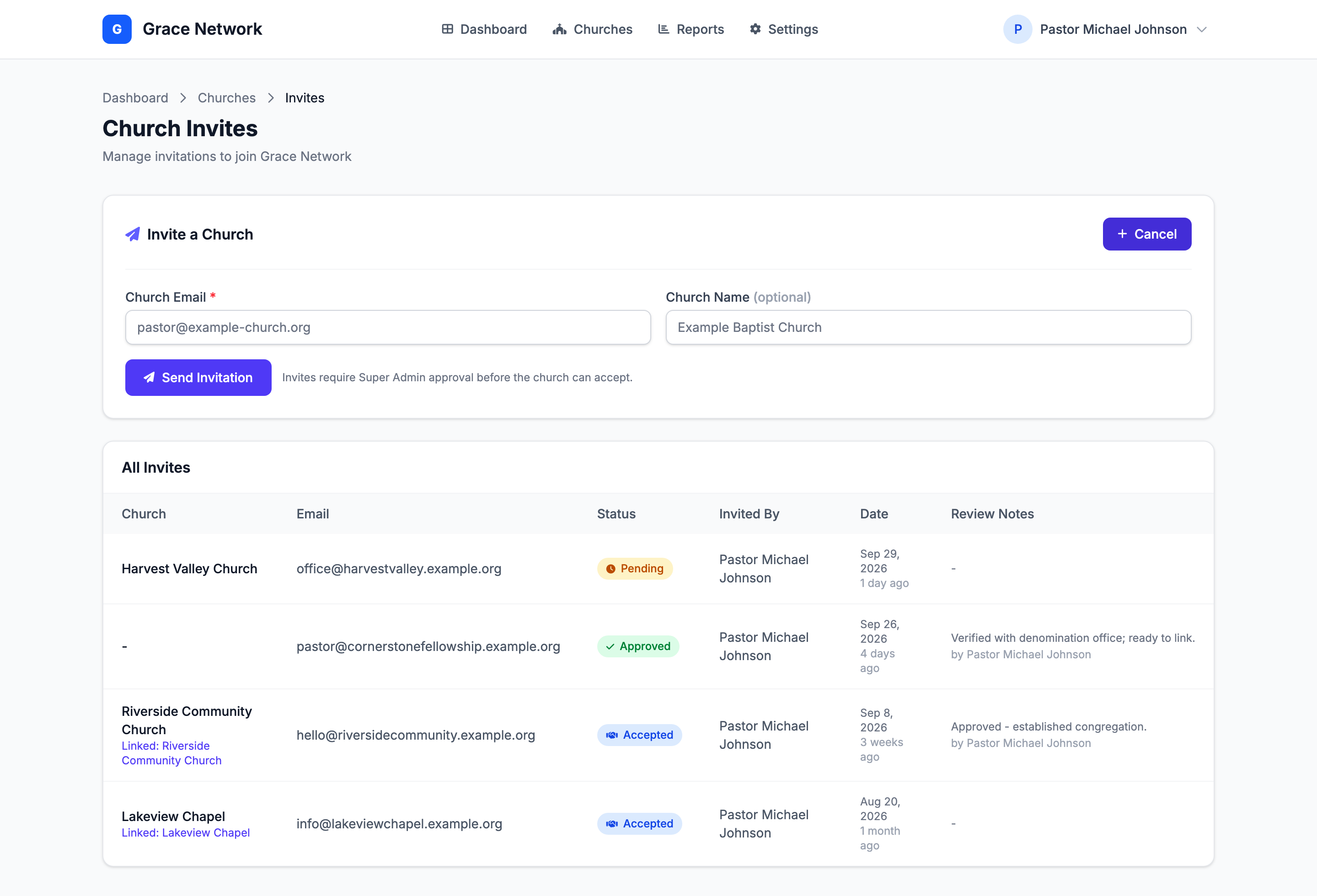
Church invitations are managed on the Church Invites page, reached from Churches → View Invites (or Invite Church) (admins only):
- In the Invite a Church card, click New Invite.
- Enter the Church Email (required) and, optionally, the Church Name, then click Send Invitation.
- The church receives an email saying it has been invited and that the invitation is pending approval. The invitation is reviewed by the TimelyChurch team; invites must be approved before the church can accept them.
- Once approved, the church receives a second email with an Accept Invitation button. A church administrator accepts it (see Joining an Association), and the church appears in your Member Churches list.
The All Invites table shows each invitation's Church, Email, Status (Pending, Approved, Rejected, or Accepted), Invited By, Date, and any Review Notes left during approval. Once a church is linked, its row also shows Linked: and the church's name.
Note: You can't send a second invitation to an email address that already has a pending or approved one. The page shows "An invite has already been sent to this email address."
Member-church limit: your Multi-Campus plan sets how many member churches your association can have, and your primary church counts toward that number. When you are at the limit, a new invitation is not created — it will not appear in the All Invites table. If a church tries to accept an approved invitation after you have reached the limit, it sees "Plan limit reached — your Multi-Campus plan does not allow more member churches. Contact TimelyChurch to upgrade." Contact TimelyChurch to raise your limit.
Church detail view
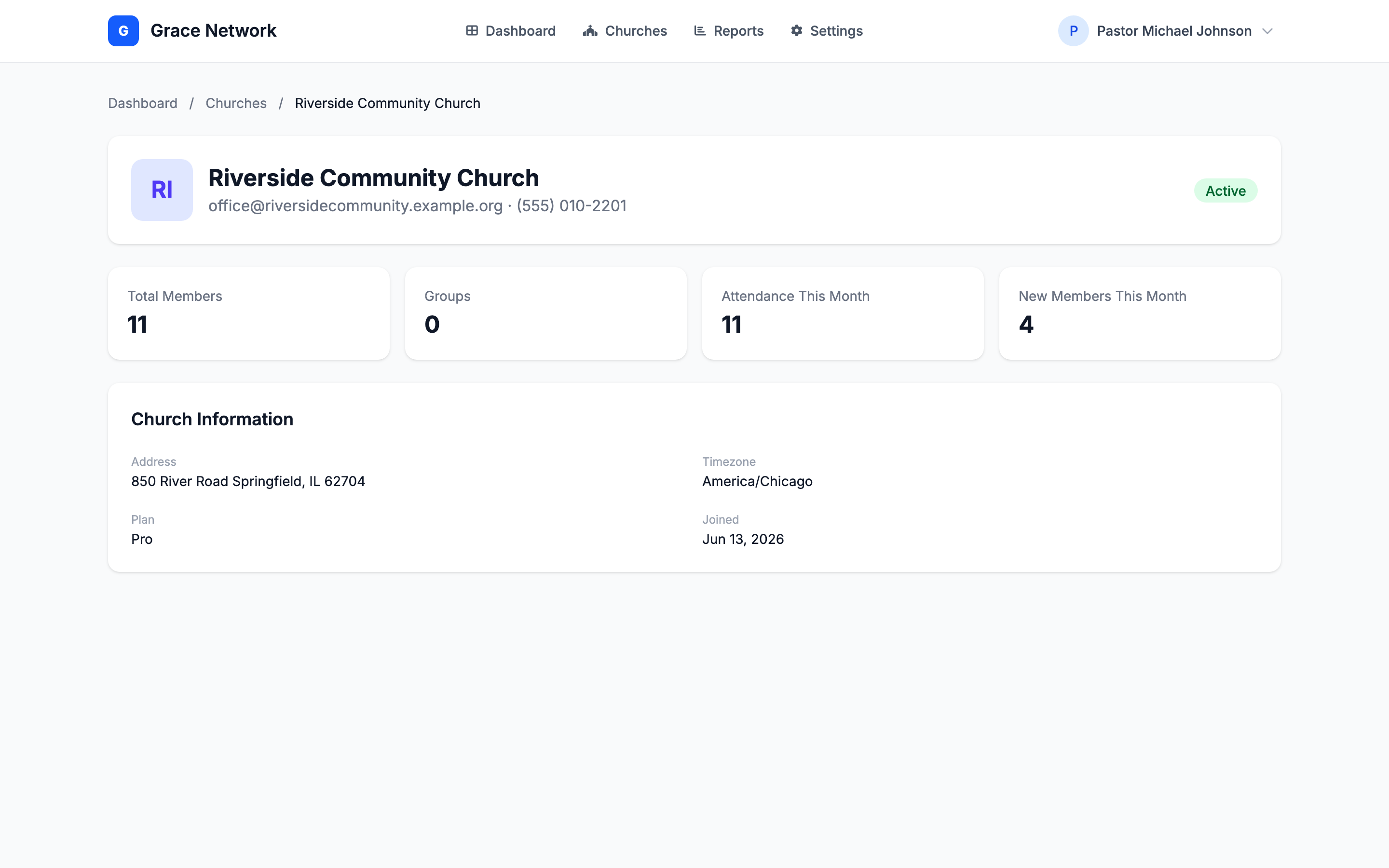
Click a church's name in the Dashboard table, or View Details on its card on the Churches page, to open that church's detail page. It is read-only and shows:
- The church's name, email address and phone number, with an Active or Inactive badge.
- Four metrics: Total Members, Groups, Attendance This Month, and New Members This Month.
- A Church Information panel with the church's Address and Timezone (when the church has entered them), its Plan, and the date it Joined TimelyChurch.
Relationship to per-church settings
Each church remains the owner of its own data. Joining an association does not hand over a church's admin panel — association admins work from the aggregated HQ views and reports described above. To remove a church from your association, contact TimelyChurch.
Related articles
- Joining an Association (for Member Churches) — what an invited church sees and how it accepts.
- Association HQ Team and Roles — inviting colleagues, the three roles, and accepting an HQ invitation.
- Association Reports — every report card and table, and what the CSV exports contain.