
Song Usage and CCLI Reports
The Song Library keeps a running record of when each song is used, which powers two reports: a song usage report for planning your rotation and a CCLI summary for your licensing paperwork. Both are filtered by date range and export to CSV.
Opening Reports
- Go to Worship → Song Library.
- Click the Reports button in the header.
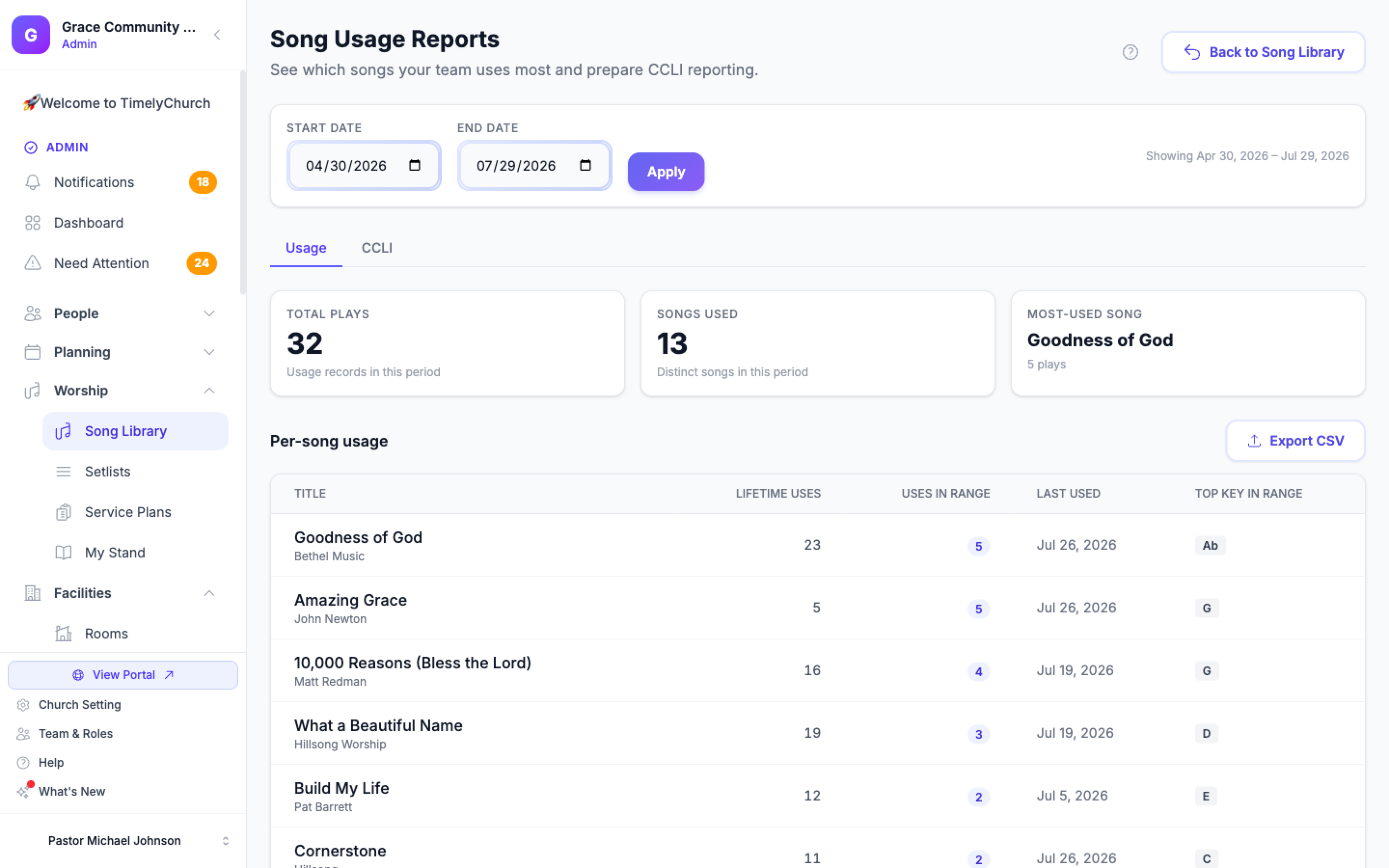
The Song Usage Reports screen opens. Pick a Start date and an End date at the top and click Apply; the line below ("Showing …") confirms the period, and every figure on the page reflects it. Two tabs sit underneath: Usage and CCLI.
Where Usage Data Comes From
A song is recorded as used the moment it is scheduled into a service plan (added as a Song item, or brought in with Load setlist) -- not when the service is over. Views of a public share link for the song or its set count as uses too. That means your figures reflect what you have planned, even before Sunday arrives. Each use updates the song's use count, last-used date, and usage history.
Usage is recorded from the moment a song is scheduled or shared, so services from before your church started using TimelyChurch may not appear.
Song Usage Report
The Usage tab shows three cards for the selected period -- Total Plays, Songs Used, and the Most-Used Song -- and a Per-song usage table:
- Lifetime Uses -- How many times each song has ever been used.
- Uses in Range -- How many times it was used in the selected period.
- Last Used -- The most recent date the song was used.
- Top Key in Range -- The key it was used in most often in the period.
If no songs were used in the period, the table shows lifetime usage instead, so you still have context.
Use it to spot overused songs, rediscover ones you have not sung in a while, and balance your rotation.
Export
Click Export CSV on the usage section to download the report. The CSV opens in any spreadsheet, so you can sort, chart, or share it with your team.
CCLI Summary
If your church reports to CCLI, the CCLI tab collects the usage for the selected period, ready for your reporting. Songs with a CCLI number lists each song's CCLI Number, Title, Artist, and Plays in Range -- exactly what you report. Songs missing a CCLI number lists songs that were used but have no number yet: add one on each song so it can be reported.
Note: This is a reporting aid for filling in your CCLI report by hand. TimelyChurch does not send the report to CCLI for you.
Export
Click Export CSV on the CCLI section to download the summary for your licensing records.
Tips
- Pick the range that matches your license period. Set the date range to your CCLI reporting window before exporting the summary.
- Review usage before planning. A quick look at the Not Used (30 days) view in the Song Library is the easiest way to keep your song rotation fresh.
- Keep CCLI numbers filled in. The more complete your song metadata, the more useful the CCLI export.
Related Articles
Last updated: September 30, 2026