
Exporting Charts and Slides
TimelyChurch can turn any song into a printable chart or a set of projection slides. The Export menus offer print-ready PDFs for musicians and lyric slides for your projection software -- ProPresenter, PowerPoint, Keynote, and beyond.
Where to Export
There are three places to export from:
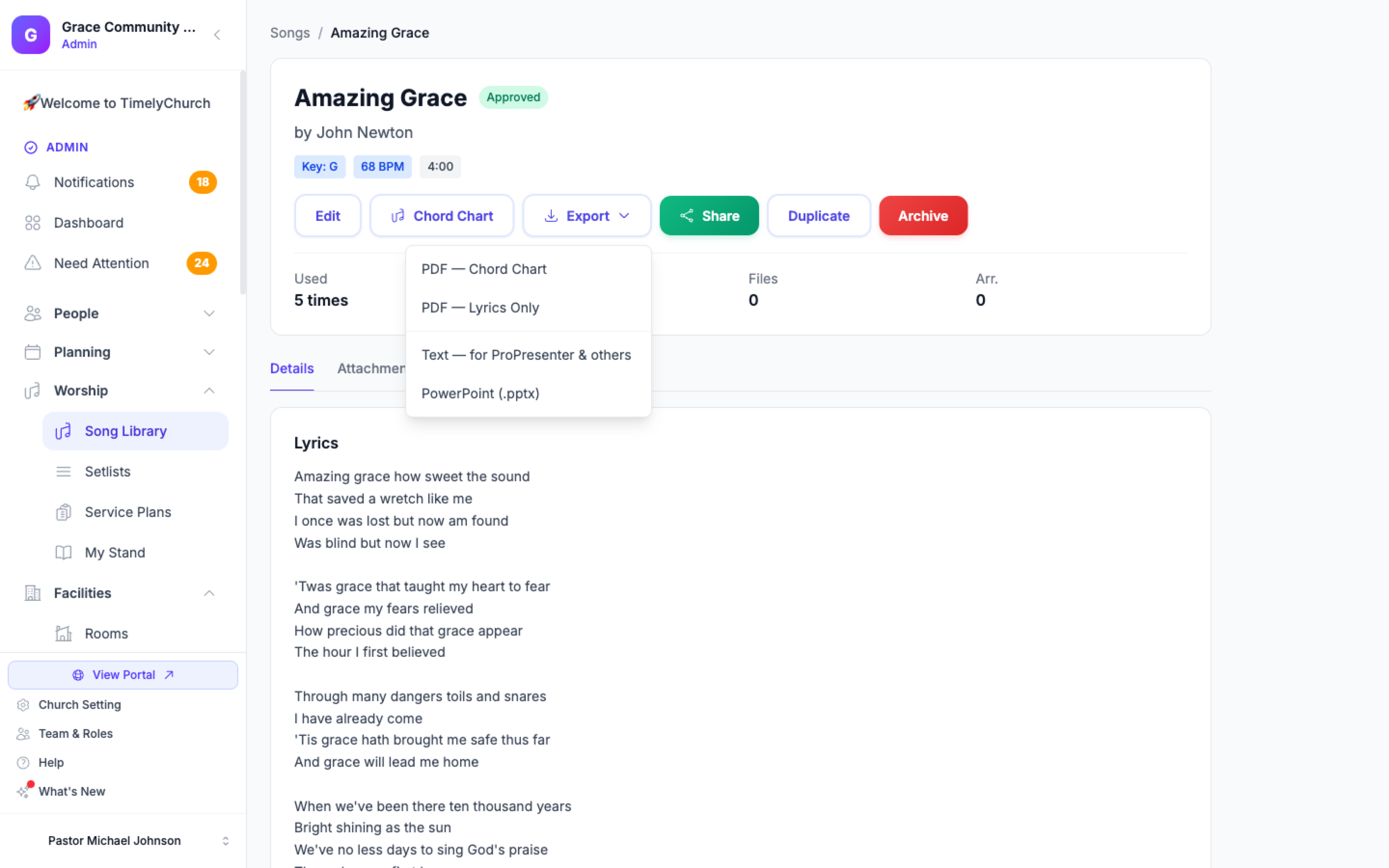
- The song detail page -- the Export button in the header. It has two jobs: Slides — preview & export… for the congregation slides, and For the band: PDF — Chord Chart… and PDF — Lyrics Only.
- The Chord Chart Editor -- the Export button in the command bar. It lists every format directly, grouped under PDF and Slides (see below).
- A setlist -- each song's Actions menu in the setlist builder offers the same Slides — preview & export…, PDF — Chord Chart… and PDF — Lyrics Only options as the song page.
PDF -- for Musicians
From the song page or a setlist:
- PDF — Chord Chart… opens Export chord chart and asks Which key? Pick a major key (the song's key is marked "current") or one of the Minor keys. The chart is transposed on export and the key is written into the file name.
- PDF — Lyrics Only downloads the words with no chords.
From the Chord Chart Editor's Export menu (PDF group):
- Chord Chart (Current Key) -- The full chart in the key you are viewing.
- Lyrics Only -- Lyrics with no chords.
- Nashville Numbers -- The chart in Nashville-number notation.
Every chord-chart PDF is US Letter, portrait, in a readable print font. A Layout selector in the editor lets you choose Auto (the system decides one or two columns based on how much fits), 1 column, or 2 columns before you export -- Auto is the safest default since it never lets a long line split awkwardly between columns. Use Open PDF Preview in the editor to view it in a new tab, in your chosen layout, before downloading.
Exports always use the published chart. If you have unpublished changes in the editor, the Export menu reminds you: "Exports use the published chart, not this draft." For details on the editor itself, see Chord Charts and Key Transposition.
Slides -- for the Congregation
Slides — preview & export… (on the song page and in setlists) shows you the real slides first. You set the language, text sizes, colours and lines per slide, then pick a format: Download ProPresenter (.pro), PowerPoint / Keynote, PDF, Images (.zip), or plain text. See Previewing and Exporting Congregation Slides for the full walkthrough.
The Chord Chart Editor's Export menu also lists the slide formats directly under Slides, for when you already know what you want:
- Text — for ProPresenter & others
- PowerPoint (.pptx)
- ProPresenter (.pro)
- Slides PDF
- Slide Images
Slides carry the lyrics only -- no chords, no band notes, and no section labels on the congregation slide.
The Plain-Text File
The text export is a plain-text (.txt) file with the song's lyrics organized into slide groups -- one group per section, separated by a blank line:
Verse 1
Amazing grace how sweet the sound
That saved a wretch like me

Verse 2
'Twas grace that taught my heart to fear
And grace my fears relieved
Lines written before the song's first section heading come first, in a group named Lyrics (the chart itself shows them without a label).
In ProPresenter, use Import → Text and each blank-line-separated group becomes one slide. Most other presentation software can import the same file. The file is UTF-8, so accented characters and non-English lyrics come through correctly.
Tip: The ProPresenter (.pro) and PowerPoint files are finished slides with no extra setup. The text file is best when your church already keeps its own templates in its presentation software.
Exporting a Whole Set
Chord-chart and slide exports are per song. To prepare an entire service, export each song from the setlist's per-song Actions menu, or let your team read the set live on their own devices in My Stand instead of from printed charts -- My Stand can also print the whole set. If your media team uses a Mac or Windows computer for projection, Song Sync can deliver each upcoming set's slides to it automatically.
Related Articles
- Song Library
- Chord Charts and Key Transposition
- Previewing and Exporting Congregation Slides
- Building Setlists
- Song Usage and CCLI Reports
Last updated: October 3, 2026