
Sermon Series
Sermon Series let you group related sermons under a common theme or topic. When visitors browse your church website, they can explore series to find related messages. Series also provide visual branding with cover images and descriptions.
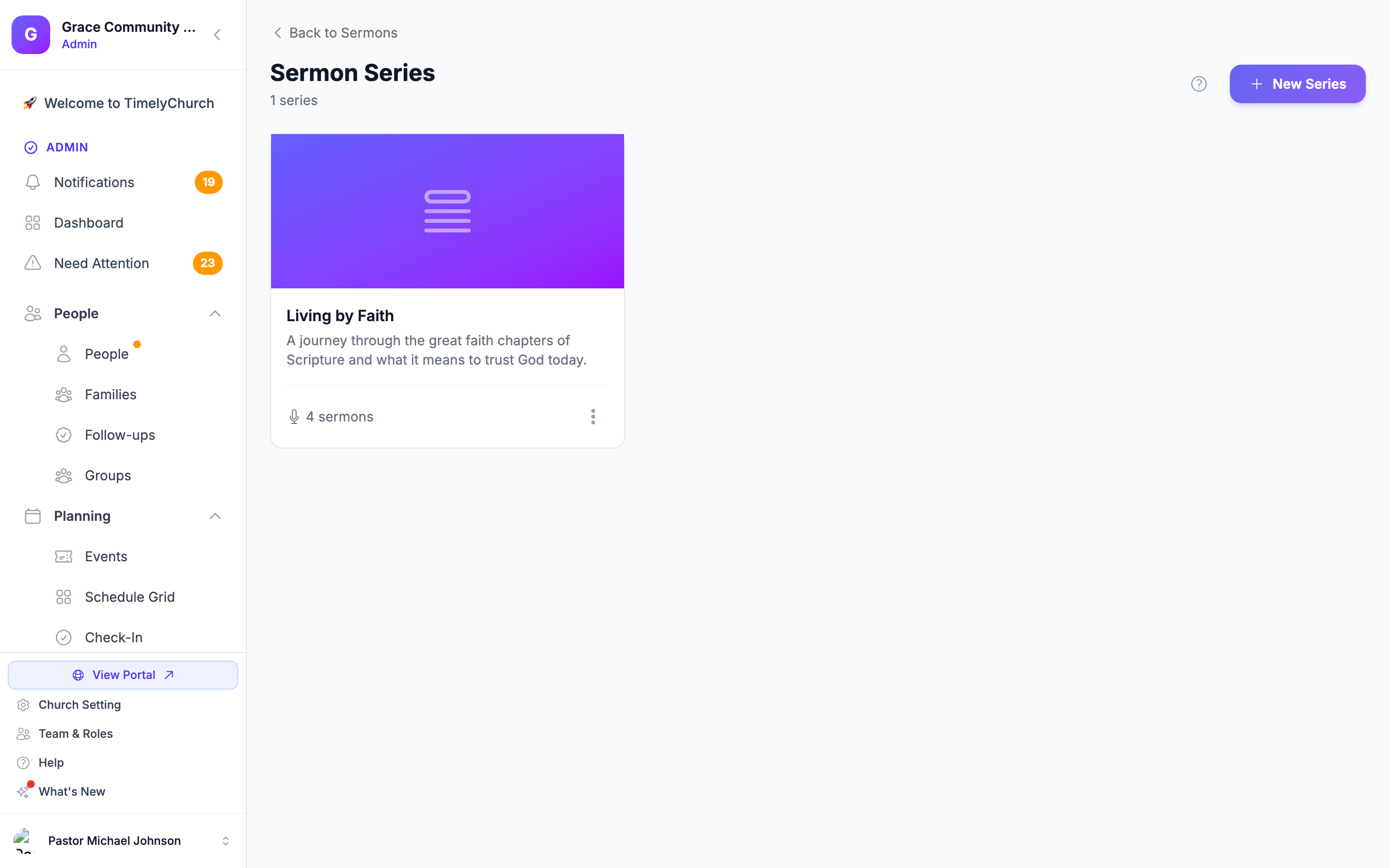
Accessing Sermon Series
- From the admin sidebar, expand Communications and click Sermons.
- At the top of the sermons page, click the Series button.
You will see the Sermon Series index page with a grid of all your series, including their cover images, descriptions, a count of the published sermons in each series, and an "Inactive" badge on any series that is hidden from your website.
Creating a New Series
- Click New Series in the top-right corner.
- Fill in the following fields in the modal:
| Field | Required | Description |
|---|---|---|
| Title | Yes | The series name (e.g., "Faith in Action"). |
| Description | No | A brief description of the series topic. |
| Series Image | No | A cover image. Recommended aspect ratio is 16:9. |
| Start Date | No | The date the series begins. |
| End Date | No | The date the series ends. |
| Active (show on website) | No | Whether the series is visible on your website (checked by default). |
- Click Create Series.
Editing a Series
The three-dot menu on each series card gives you two ways to edit:
-
Quick Edit -- Opens the same modal used when creating a series, pre-filled with the series details. Use this for fast changes to the title, description, dates, cover image, or active status. Click Update Series to save.
-
Full Edit -- Opens the dedicated edit page, which shows all the fields above plus:
- A preview of the current cover image with a checkbox to remove it.
- A list of all sermons currently assigned to this series, with links to edit each sermon.
Make your changes and click Update Series.
Both options update the same series -- choose whichever is more convenient.
Series Fields Explained
Title
The display name shown on your website and in the admin. This is the only required field.
Description
A short summary that appears on your website's series listing page and within the series detail page. Keep it concise -- one to two paragraphs.
Series Image
The cover art for the series. This image appears:
- On the series listing page.
- As a fallback thumbnail for sermons in this series that do not have their own thumbnail.
- In the admin series grid.
Upload any image file up to 5 MB. A 16:9 aspect ratio is recommended for best display across devices.
Start and End Dates
These dates are informational and help you organize series chronologically. They do not automatically show or hide sermons.
Active Status
- Active -- The series appears on your public website.
- Inactive -- The series is hidden from the public website but still accessible in the admin.
Assigning Sermons to a Series
There are two ways to assign a sermon to a series:
- When creating or editing a sermon -- Select the series from the "Series" dropdown on the sermon form.
- From the series Full Edit page -- The "Sermons in this Series" list shows every sermon currently assigned, and each entry links straight to that sermon's edit form, where you can change or clear its series.
Only active series appear in the dropdown when creating or editing sermons.
Activating and Deactivating
From the series grid, click the three-dot menu on any series card:
- Select Deactivate to hide the series from the public website.
- Select Activate to make it visible again.
Deactivating a series does not unpublish the individual sermons within it. Those sermons will still appear in your sermon listing if they are published.
Deleting a Series
- From the series grid, click the three-dot menu and select Delete.
- Confirm the deletion in the confirmation dialog.
Alternatively, from the Full Edit page, click Delete Series at the bottom-left.
Important: A series can only be deleted once it has no sermons assigned to it. If the series still contains sermons, the deletion is blocked with the message "This series has … sermon(s). Reassign them first or use Archive (toggle inactive) instead." To remove the series, first edit each of its sermons and choose another series (or No series), or simply Deactivate the series to hide it without deleting. Deleting a series never deletes the sermons themselves.
Speakers and Podcast Settings
Speakers and the church-wide podcast feed are managed in their own dedicated screens, both linked from the Speakers and Podcast buttons at the top of the Sermons index page. They are documented separately so each has the depth it deserves:
- See Sermon Speakers for creating, editing, and linking speakers (including the public speaker-archive page).
- See Podcast Feed for configuring your podcast feed, its podcast-app details, and submission to podcast directories.
Related Articles
Last updated: September 30, 2026