
My Stand — The Big Picture
If you are new to leading or playing worship in TimelyChurch, My Stand is the one screen to understand first. It is the live, zero-upload music stand your whole team reads from -- on a phone propped on a mic stand, a tablet on a keyboard, or a laptop at the sound desk. No printing, no PDFs to email, no "did you get the update I sent?" This article is the tour: what My Stand is, who has it, and how the pieces you will read about elsewhere (Go Live, team assignment, practice tools, personal marks) fit together.
What My Stand Is
My Stand is a page inside the Member Portal -- not the admin dashboard. A worship leader builds a setlist on the admin side and assigns it to the worship team; every musician on that team then opens the same set in My Stand on their own device and reads live from it. Because it is one shared source, everybody is always looking at the current version -- if the leader changes a key or reorders a song, every stand in the room updates within seconds.
My Stand vs. the public share link. Anyone with the link can view a shared service plan without an account (see Worship Team View). Signing in to the Member Portal gets you the full My Stand experience described here -- personal settings, practice tools, marks, and following the leader live.
Getting to My Stand
- Sign in to the Member Portal (magic link or password) and tap My Stand in the Team section of the portal navigation.
- Or tap the link in the message your leader sends with Notify team -- it takes you straight to your stand.
Access is automatic for anyone who serves on a worship team; church admins can always open it too.
Your Sets List
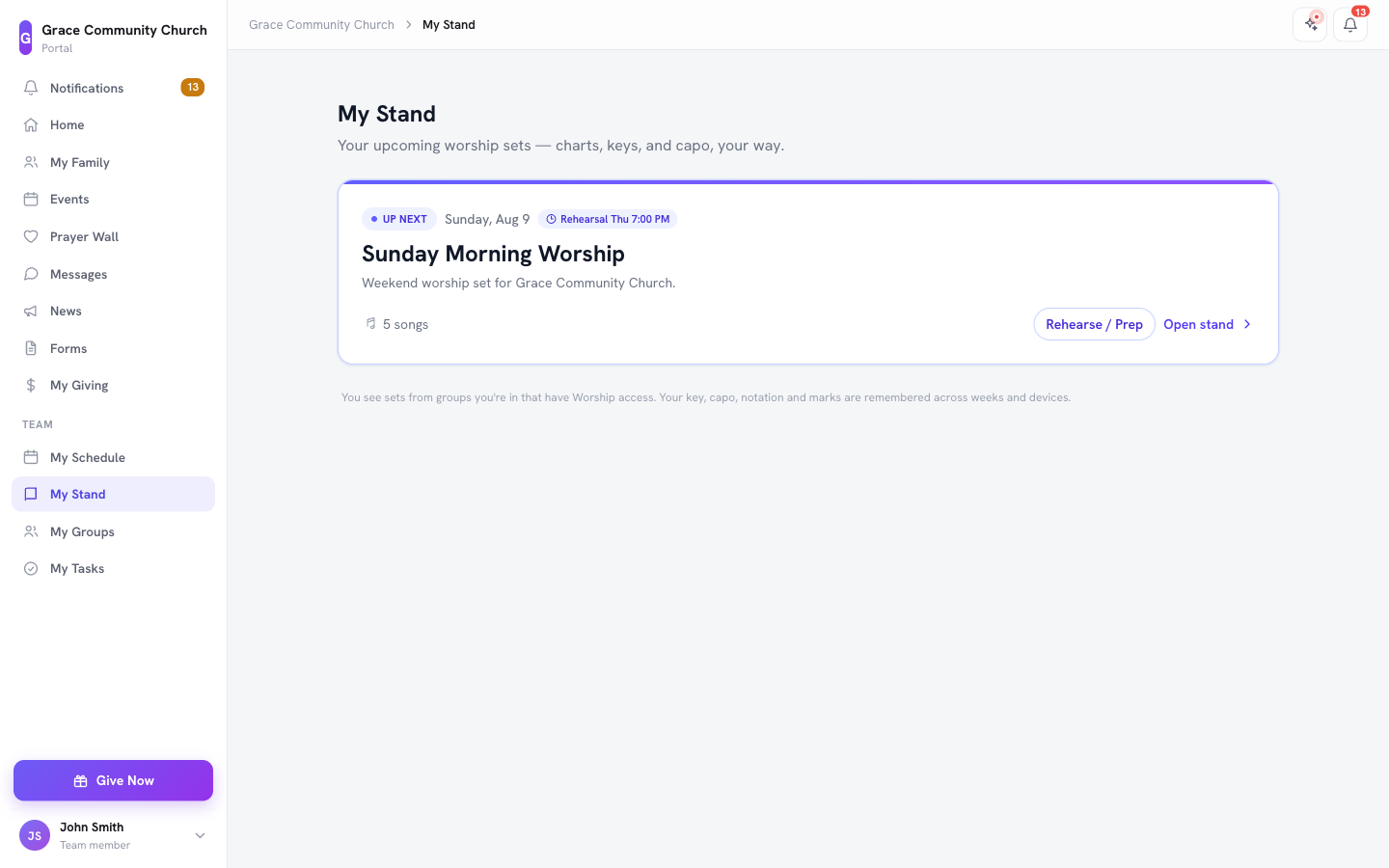
The My Stand home screen shows the setlists for the worship teams you serve on (admins see every set), grouped for relevance, not just by date:
- Up next -- one hero card: whichever set is live right now, or otherwise the soonest upcoming set that actually has songs in it.
- Later -- the rest of your upcoming and undated sets.
- Past -- a collapsed, de-emphasized history section (nothing is ever deleted, it just does not compete with what matters this week).
A Live now pill appears on any set currently being led, so you never miss that a rehearsal or service has already started.
The Reader
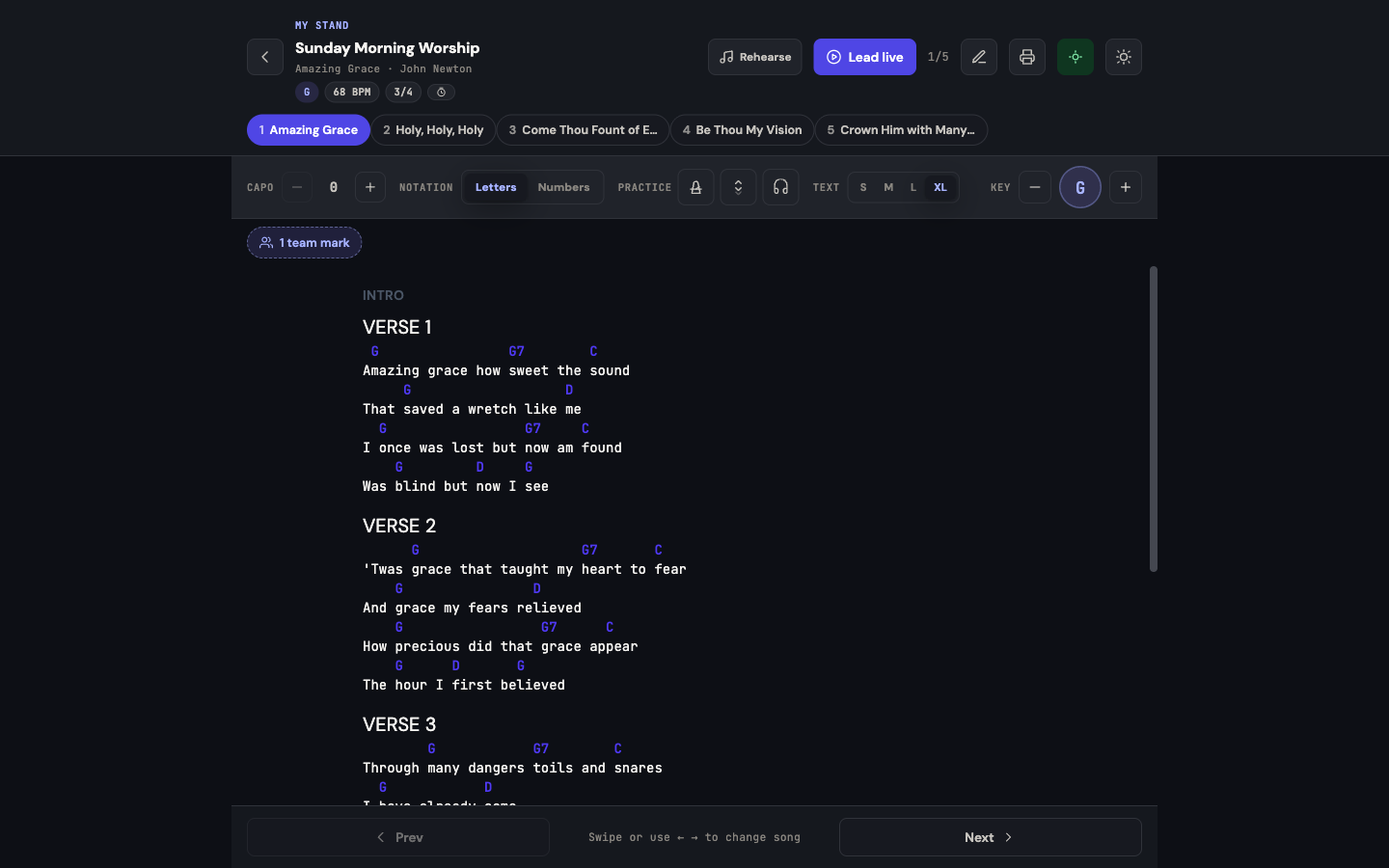
Open a set and you land in the reader -- the actual chart view:
- Song jump strip -- a row of pills across the top, one per song, so you can jump to any song in the set instantly. While a leader is driving Go Live, a small dot marks the song the leader is currently on.
- Chips -- key, BPM, and meter (time signature) for the current song, at a glance.
- Personal controls -- your own notation (letters or Nashville numbers, chords or words only) and text size, and -- when the leader has switched on Let each player pick their own key -- your own key and capo. These are yours alone: your bass player can read in a different key from your vocalist, on the exact same shared set, without either of you affecting the other. When the leader has not allowed it, the key shows Set by leader.
- Listen buttons -- YouTube/Spotify links when the song has them.
- Keep-awake and theme toggle -- keep the screen from sleeping mid-song, and switch between light and dark for a dim stage.
- Print -- print the current chart (with your own marks) from the reader at any time.
- Tools -- the metronome, autoscroll, practice recording and reading options (two columns, full screen, swipe to change song). See Practice Tools.
What the Chart Itself Tells You
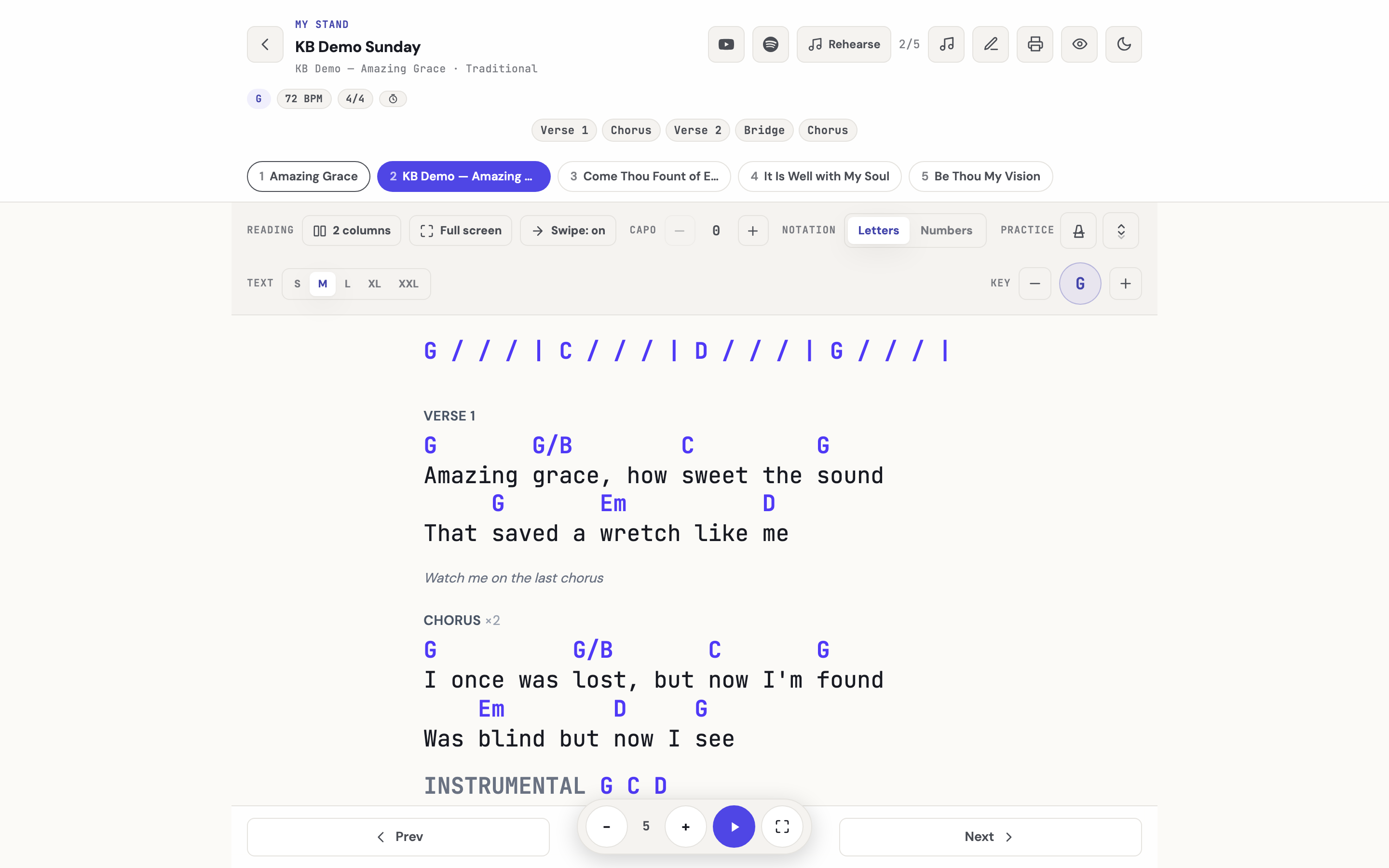
Three things the chart carries show up in the reader, above and inside the words:
- The sequence strip -- the playing order the leader built (Verse 1, Chorus, Verse 2, Chorus, Bridge, Chorus) sits under the song header, the same strip the Chord Chart PDF prints. It also shows in the setlist's chart drawer.
- Band notes -- anything the person who wrote the chart left for the musicians (Watch me on the last chorus, Drums out on verse three) appears on its own line between the lyrics, and a section played twice carries a ×2 on its heading. None of it ever reaches the congregation's slides. See Writing a Chord Chart in the Editor.
- Headings as written -- the reader shows the section headings the chart has (a
[Chorus:]reads Chorus) and adds none: lines before the first heading have no label. A label at the start of a line of chords, such as Instrumental, prints in front of those chords and never changes key.
Your Key, Spelled the Way the Chart Spells It
The KEY stepper and the quick picker offer the same list of keys the chord chart editor does, so stepping up from A gives B♭, not A♯ -- and E♭, F and Gm where they belong. The tablet and the printed chart call the same key by the same name.
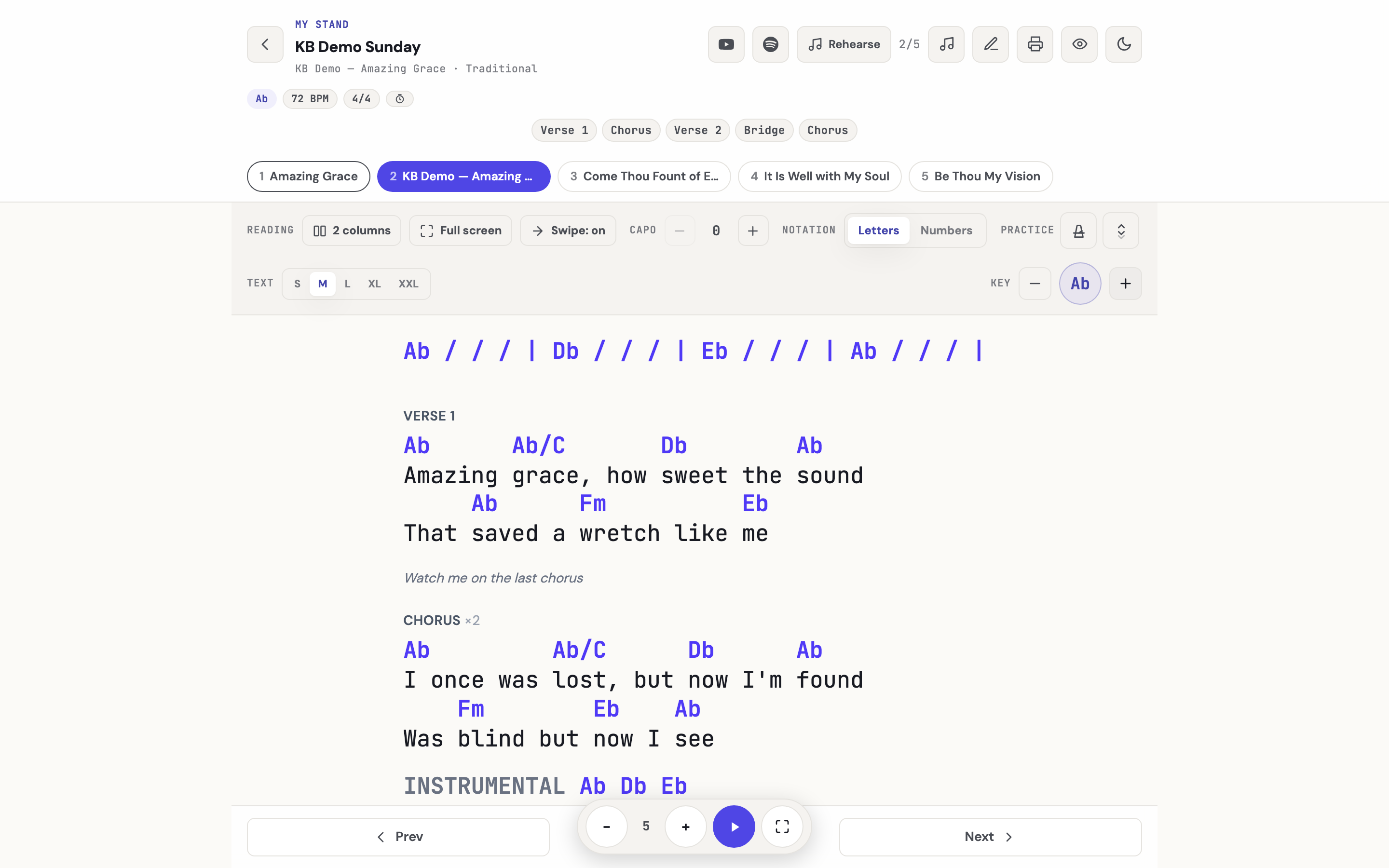
Charts without a key line still follow the KEY stepper. Many older charts carry no {key:} line. The reader takes such a chart's key from the arrangement (the same key the PDF uses), so the stepper transposes it, Nashville numbers follow the real key, and capo shapes come from the real key. A chart with no key anywhere is shown as written — choose its key in the editor first.
Everything Else Lives Here Too
My Stand is the hub for the rest of the worship-team experience -- each has its own article with the full detail:
- Go Live -- the leader taps Lead live to start a live-follow session so the whole room's stand turns to the same song automatically. See Go Live on Sunday.
- Practice tools -- metronome, autoscroll, and foot-pedal page turns while you read. See Practice Tools.
- Personal marks -- private highlights and notes that survive a transpose, with an opt-in to share them with the team. See Personal Marks.
- Rehearse -- tap Rehearse / Prep to mark songs learned, RSVP to a rehearsal, and play along with a reference recording. See Rehearsal Readiness and Reminders.
- Your worship team -- how a setlist is assigned to your team, and how your leader keeps everyone in the loop. See Your Worship Team on a Setlist.
A Typical Week, Start to Finish
- Your leader builds the setlist and assigns it to your worship team.
- You get notified (Telegram or email) that the set is ready, and open it in My Stand.
- During the week, you head to Rehearse: mark songs learned, play along with the reference recording, and RSVP.
- Sunday morning, your leader taps Lead live -- your stand turns to the current song automatically as the service moves.
- If you cannot make it some week, you propose a swap ahead of time instead of leaving a gap -- see Swapping When You Can't Serve.
Related Articles
- Worship & Songs Overview
- Building Setlists
- Share a Service Plan with Your Band
- Go Live on Sunday
- Your Worship Team on a Setlist
- Practice Tools: Metronome, Autoscroll & Foot Pedals
- Personal Marks and Sharing Them with Your Team
- Rehearsal Readiness and Reminders
Last updated: September 30, 2026