
Parent Check-In / Check-Out Notifications
TimelyChurch can send a parent a short message the moment their child is checked in, and again when the child is checked out. It is a reassurance feature for families: they know their child arrived safely and, at pickup, who collected them.
This feature is off by default for every church. Nothing is sent until an administrator deliberately turns it on. Even then, individual guardians can be switched off. This article explains how to enable it, who receives notices, how they are delivered, and how to opt out.
What a Guardian Receives
When enabled, a guardian gets a localized message (in their own language) at check-in and/or check-out:
- Check-in notice -- the child's first name, the group or room (or "kids check-in"), your church name, the local time, and the same pickup/security code that prints on the label ("Keep this code — you may be asked for it at pickup.").
- Check-out notice -- confirmation the child was checked out, including who collected them.
Notices are sent by Telegram if the guardian has connected Telegram to your church, and by email otherwise. Emails end with "You are receiving this because you are listed as a guardian for [child] at [church]." and explain how to stop them.
Note: Only child check-ins trigger a notice. Volunteer and general (adult) check-ins never send one -- this feature is only ever about children.
Turning Notifications On (Church-Wide)
The master switch lives in Check-In Settings. It is off until you enable it.
- Open Planning > Check-In to reach the Check-In Station, then click the gear (Check-In Settings) icon in the page header.
- Go to the Options tab (the third tab).
- In the Check-in Notifications card, switch on "Notify parents on check-in and check-out."
- A "When to send a notice" dropdown appears. Choose one:
- Both check-in and check-out (the default) -- a notice on arrival and at pickup.
- Check-in only -- a notice on arrival only.
- Check-out only -- a notice at pickup only.
- Click Save Options at the bottom of the tab. (Changing these options needs the Check-In Manage permission.)
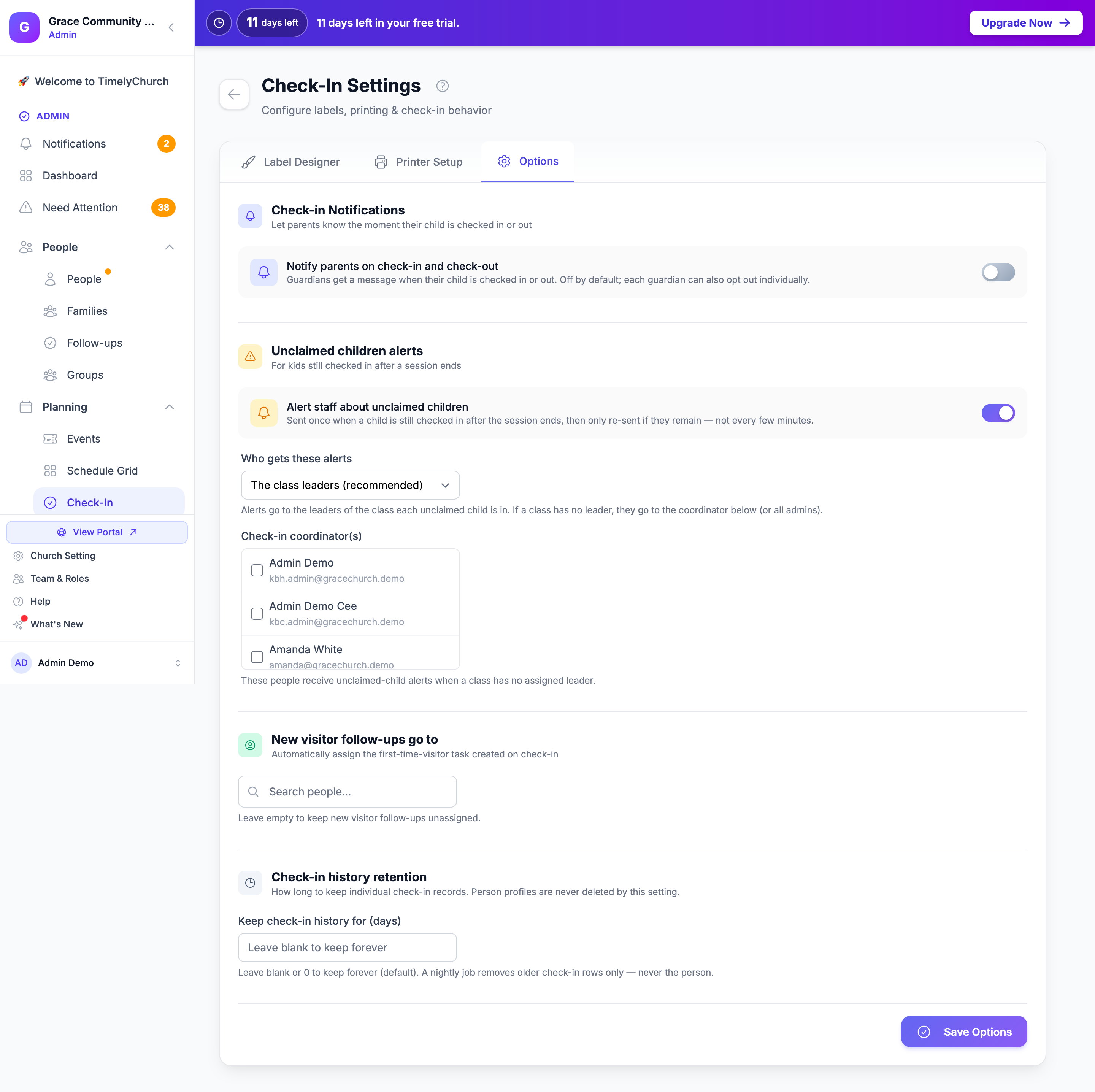
The screen states plainly that notifications are "Off by default; each guardian can also opt out individually." The "When to send a notice" dropdown is only shown while the master toggle is on. There is nothing else to configure for the feature to work.
Who Receives Notices
Recipients are resolved automatically -- there is no per-child recipient list to maintain.
- Notices go to the child's legal guardians only, gathered across every family the child belongs to.
- Guardians are de-duplicated, so a guardian in two of the child's families still gets one message per event.
- The child is never notified.
- A guardian who is a minor is never sent check-in notices (the option is forced off for them).
Tip: Because recipients come from your Family records, keep those accurate. Open a person in People > Family tab to confirm who is listed as a legal guardian and who is a child. See First-Time Setup for getting families and guardians in place.
How Notices Are Delivered
For each guardian, TimelyChurch picks the channel automatically:
- Telegram if linked. If the guardian has connected Telegram to your church, the notice is a Telegram message.
- Email otherwise. If Telegram is not linked, the notice is emailed.
- Automatic fallback. If Telegram is linked but the connection is inactive or the send fails, the notice falls back to email.
- Email opt-outs respected. A guardian who has unsubscribed from email, or whose address can no longer receive email, will not be emailed -- including on the Telegram-to-email fallback. If email is the only channel and there is no usable email address, that guardian is simply skipped.
Note: See Your Church on Telegram for how guardians connect Telegram. If a guardian never connects it, they simply receive notices by email instead.
How to Opt Out
There are two independent off-switches, and both are always honored.
Per Family (set by an administrator)
Use this when one guardian in a family wants notices and another does not.
- Open a guardian's profile in People.
- Go to the Family tab.
- Under each adult guardian is a Check-in notices button (the Notices column in the table view).
- Filled indigo = the guardian is receiving notices.
- Gray = the guardian has opted out.
- Click the button to toggle it.
You can also switch it in the family's Edit Member dialog (Check-in notices under Child Safety).
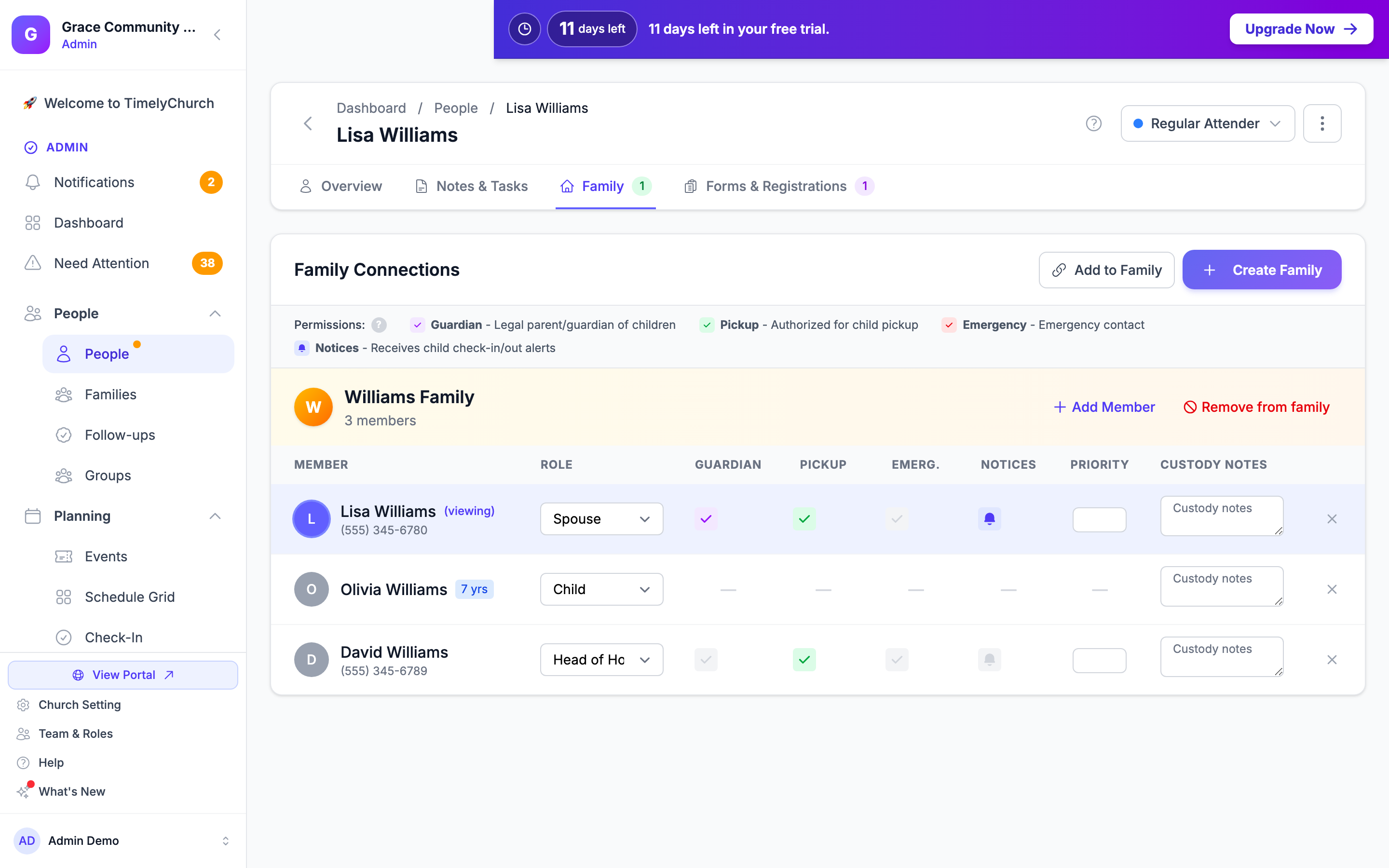
This setting is on by default for adult guardians. (For anyone who is a minor, it is forced off and cannot be enabled.)
Per Account (set by the guardian)
A guardian who has a team or admin login can manage it themselves:
- Sign in and open Notification Settings from the account menu.
- Under Safety & Operations, find Child check-in notices ("When a child in your family is checked in or out at a kids or youth service.").
- Switch it off. Changes save automatically.
Turning off Child check-in notices stops notices on both email and Telegram for that guardian, regardless of the per-family setting.
Parents who only use the member portal (without a team or admin role) do not see this setting -- they ask the church office to switch their Check-in notices off, as the email footer explains.
Note: The two opt-outs work together. A guardian receives notices only when the church master switch is on, the per-family button is indigo (on), and their own "Child check-in notices" preference (if they have one) is not switched off.
It Never Blocks a Check-In
Notifications are sent separately from the check-in itself, so they can never hold up the kiosk:
- The notice is prepared and sent a moment after the check-in or check-out, not while the family is waiting at the screen.
- If sending fails -- a bounced email or a Telegram outage -- the notice is simply missed. It never causes a stuck screen or a failed check-in.
The check-out notice fires exactly once, at the moment a child is actually checked out. Editing an already-checked-out record later does not re-send it, so guardians never get duplicate pickup messages.
Common Questions
We turned it on but no one is getting messages. Check three things in order: (1) the master toggle in Check-In Settings > Options is on and saved with Save Options; (2) the recipient is listed as a Legal Guardian on the child's Family record (not the child, and not a minor); (3) the guardian's per-family Check-in notices button is indigo and their own Child check-in notices preference is not switched off. Also confirm the guardian has Telegram linked or a usable, non-opted-out email.
Can I send only pickup notices? Yes. In Check-In Settings > Options, set "When to send a notice" to Check-out only.
Does a volunteer or an adult general check-in trigger a notice? No. Only child check-ins do.
A guardian is getting notices in the wrong language. Notices use the guardian's own language preference, then your church default, then the app default. Set the guardian's language on their profile.
One parent wants notices, the other doesn't. Use the per-family Check-in notices button on each guardian in the People > Family tab -- it is set independently for each adult.
Will editing an old check-in re-notify the parents? No. Check-out notices fire only on the transition from checked-in to checked-out. Re-saving an already-checked-out record does not send another message.
Related Articles
- Check-In Settings -- Where the master toggle and "When to send a notice" option live.
- The Check-In Process -- The check-in and checkout flows that trigger these notices.
- Security Codes, Labels, and Child Safety -- The pickup/security code included in the check-in notice.
- Unclaimed Children -- The safety alert for children still checked in past the expected end time.
- First-Time Setup -- Getting families and legal guardians set up so recipients resolve correctly.