
Practice Tools: Metronome, Autoscroll & Foot Pedals
My Stand is not just a place to read charts -- it is built to help you play. The reader includes a metronome, hands-free autoscroll, and foot-pedal/keyboard page turns so you can keep both hands on your instrument. These are personal tools: they run on your device only and never change what anyone else sees.
Opening the Tools
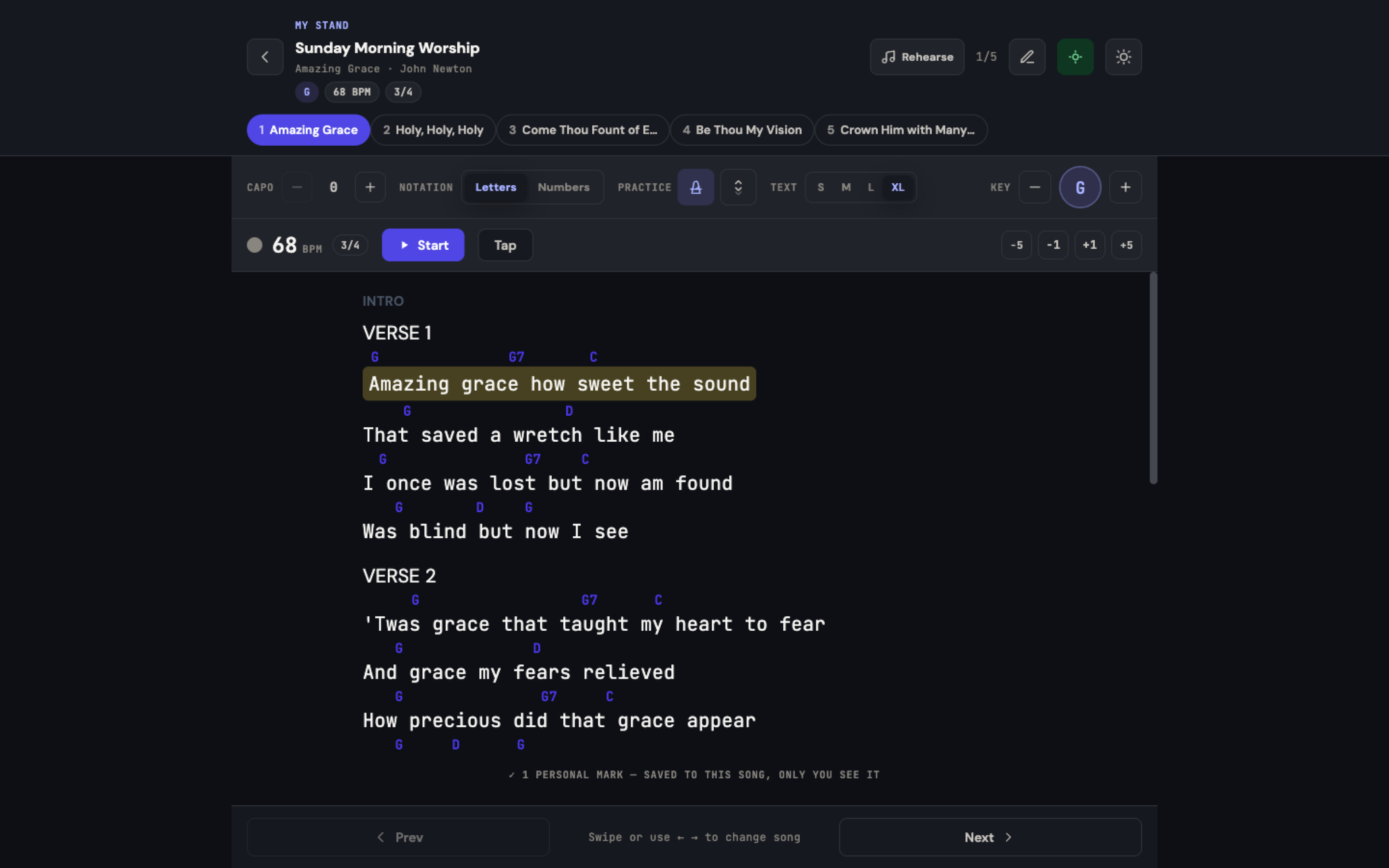
In the reader, tap Tools to open the tools panel. Besides the metronome and autoscroll, it holds the reading controls (Reading: 2 columns, Full screen, Swipe: on/off), Capo, Notation (Letters or Numbers), Practice, Text size, and Key.
On a phone, Tools within reach at the end of the panel lets you choose which tools stay on screen while you play; everything else stays tucked in the panel.
Metronome
Tap Metronome to keep time while you practice:
- Tempo from the song -- The metronome starts at the BPM stored on the song (or the selected arrangement), so it is already close to right. The song's time signature shows next to it; if the song has no tempo, you see No tempo set.
- Start / Stop -- The metronome is off by default. When you press Start, a one-bar Count-in flashes in a different colour before the beat begins.
- Tap -- Tap in time with the music to set the BPM by feel.
- Fine-tune -- −5, −1, +1 and +5 nudge the tempo.
- Visual pulse + click -- A beat pulse pairs with an audible click; the downbeat is accented using the song's time signature.
- Personal only -- Your metronome and any tempo you set are for you. The leader's stored BPM is not changed, and your changes are not sent to the rest of the team.
Autoscroll
For hands-free reading, tap Autoscroll:
- Start scrolling / Pause scrolling -- Starts or stops the scroll for the current song. Starting waits one bar (Starting…) so you have time to get your hands on your instrument.
- Speed -- Set how fast the chart scrolls; your chosen speed is remembered for you.
- Smooth and pause-aware -- The chart pane scrolls smoothly and pauses when you touch the screen, so you can nudge your position and let it resume.
- Works with Go Live -- Autoscroll runs even while you are following the leader, so you get both a shared page turn and a steady scroll within the song.
Foot Pedals and Keyboard Page Turns
If you use a Bluetooth page-turn pedal (the kind guitarists and pianists clip to a mic stand), My Stand supports it out of the box -- no pairing inside the app required. The reader shows "Foot pedal ready — Most Bluetooth page-turners work here." with the keys it listens for.
| Key sent by the pedal | What it does in My Stand |
|---|---|
| Page Down / Page Up | Scroll the chart |
| Space | Start / stop autoscroll |
| Left arrow / Right arrow | Previous / next song |
Most Bluetooth foot pedals can be configured (in their own companion app or via a hardware switch) to send these keys. Because My Stand listens for them, the same shortcuts also work from a laptop keyboard.
Tip: setting up a foot pedal. Set your pedal's two switches to send Page Down and Page Up, then open My Stand and test -- you should be able to move through a chart without touching the screen. If you prefer to change songs with the pedal, set the switches to the right and left arrows instead.
More Reading Tools
- Show chords / Words only -- Hide the chords to read just the words, and tap again to bring them back.
- 2 columns -- Lays a long chart out in two columns for less scrolling.
- Full screen -- Gives the chart the whole screen.
- Swipe: on / off -- Choose whether swiping left and right changes the song. Turn it off if you tend to brush the screen while playing.
- Keep screen awake -- Stops your phone or tablet from dimming and locking in the middle of a song.
- Print chart -- Opens a printable page of the current song. While you are marking up, Print whole set prints every song in the set, with your marks.
- Stand timer -- The small clock chip shows the time elapsed since the set went live, or since you opened it when you tap it.
- Rehearse / Prep -- Opens the Rehearse page for this set (see below).
These Tools Are Yours Alone
The metronome, autoscroll speed, and your reading preferences (notation, text size, and -- when the setlist lets each player pick their own key -- key and capo) are stored per person. Two musicians reading the same shared set can practice at different tempos and scroll speeds without affecting each other or the leader.
Practicing Along with a Recording
Separate from the metronome, the Rehearse page (reached with Rehearse / Prep in My Stand) offers a Play-along player for any song that has a reference recording -- with A–B section looping and 0.5×–1.5× speed control. See Rehearsal Readiness and Reminders for details.
Related Articles
- Share a Service Plan with Your Band
- Personal Marks and Sharing Them with Your Team
- Rehearsal Readiness and Reminders
- Worship Team View
- My Stand — The Big Picture
Last updated: September 30, 2026