
Trial and Plan Selection
When you create a church on TimelyChurch, you get 30 full days of the Pro plan to try everything. No credit card required. This page explains exactly what that means, what happens when the 30 days are up, and how to choose the right plan for your church.
The 30-Day Pro Trial
The moment your church workspace is created (see Sign Up and Create Your Church), TimelyChurch automatically starts you on the Pro plan -- our highest self-serve tier -- as a free trial.
You don't have to opt in. You don't have to enter payment information.
What's included during the trial
Everything on Pro. Concretely:
- Unlimited people, families, classes, events, groups, forms, volunteers, lessons, songs, rooms, kiosks, custom fields, and Q&A sessions.
- 5 GB of storage for photos, documents, and uploads.
- All Growth and Pro modules: Lesson Library, Check-In, Forms, Volunteers, Serving Teams, Announcements, Groups, Website Builder, Live Q&A, Songs & Music, Rooms & Facilities, Email Templates, Email Campaigns, Email Automations, Tasks, Giving & Donations, Funds, Giving Statements, Reports & Analytics.
- Pledges, Budgets, full Accounting, Service Plans, Import/Export, Custom Fields.
- Audio Analysis (BPM/Key Detection) and Song Sync (Desktop Chart Sync) for your worship team.
- Push Notifications, Custom Branding, Custom Domain, Priority Support.
The one thing that waits: sending bulk email
On a trial you can build everything for email -- write and design campaigns, save them, set up automations, and pick your recipients -- but sending bulk email needs a paid plan. The Email Campaigns page says so up front: "Sending requires a paid plan." Once you upgrade, your saved campaigns are ready to send exactly as you left them. See Sending bulk email below.
How long do I have?
The default is 30 days from the moment your church was created. You can always see how long is left:
- A banner at the top of the admin pages counts down -- for example "21 days left in your free trial." In the last week it changes to "Your trial expires in 3 days!"
- The Billing & Plans tab in Church Settings shows Trial: N days left and the date it ends.
- Your account menu (your name at the bottom of the sidebar) shows a small Trial badge with the days left.
Tip: Use the trial seriously. Import your real people, run a real Sunday with check-in, set up a giving page. The best way to know whether TimelyChurch fits your church is to actually run your church on it for a few weeks.
What Happens When the Trial Ends
If you do not choose a paid plan before the trial ends, your church moves to the Starter plan and you get an email letting you know. Nothing is deleted -- your people, events, giving records and everything else stay exactly where they are.
What you see:
- The banner at the top reads "Your free trial has ended. Extend it 15 more days as Pro, or upgrade now." with Extend 15 Days and Upgrade Now buttons.
- Church administrators also see a Your free trial has ended window with three choices:
- Extend 15 days as Pro Unlimited -- no card needed. You can do this once.
- Upgrade to a paid plan -- takes you to Billing & Plans.
- Continue on Starter (free) -- closes the window.
- Until you choose a paid plan (or extend the trial), the admin area opens only the Dashboard, the Welcome page and Church Setting. Other admin pages take you to Billing & Plans with the message "Your subscription is not active. Please subscribe to access this feature."
You can upgrade at any time -- the day the trial ends or months later. Upgrading restores access immediately, with all your data in place.
Tip: If you need a few more days to decide, use Extend 15 Days before you upgrade. If you have already used your extension and need more time, contact support.
The Three Plans
TimelyChurch has three self-serve plans. All can be paid monthly or yearly, and yearly billing saves you money versus paying month-to-month. (Larger ministries running multiple campuses can also talk to us about our concierge Multi-Campus plans -- see below.)
Starter -- Free
For very small churches just getting started.
| Limit | |
|---|---|
| Price | $0/mo |
| People | 100 |
| Team members | 5 |
| Classes | 2 |
| Groups | 3 |
| Events | 10 |
| Forms | 3 |
| Lessons | 10 |
| Storage | 100 MB |
| Bulk email | Not included |
| SMS/month | 0 |
Modules included: People & Families, Classes, Schedules, Attendance, Events, Calendar, Team Management, Settings, Messaging, Sermons.
Not included: Follow-Ups, Lesson Library, Check-In, Forms, Volunteers, Serving Teams, Announcements, Groups, Website Builder, Live Q&A, Songs & Music, Rooms & Facilities, Email Templates/Campaigns/Automations, Tasks, Online Giving, Funds, Giving Statements, Reports & Analytics, Pledges, Budgets, Accounting, Service Plans, Audio Analysis, Song Sync, Import/Export, Custom Fields, Push Notifications, Custom Branding, Custom Domain, Priority Support.
Growth -- $49/month or $488/year
The plan most growing churches land on. Adds the volunteer-coordination, communications, worship and member-facing tools you'll use every Sunday.
| Limit | |
|---|---|
| Price | $49/mo or $488/yr (save $100 -- about two months free) |
| People | 500 |
| Team members | Unlimited |
| Classes | 5 |
| Groups | 10 |
| Events | 50 |
| Forms | 20 |
| Lessons | 50 |
| Songs | 100 |
| Storage | 500 MB |
| Bulk email | Up to 500 people a day |
| SMS/month | 100 |
| Check-in kiosks | 3 |
Adds on top of Starter: Follow-Ups, Lesson Library, Check-In, Forms, Volunteers, Serving Teams, Announcements, Groups, Website Builder, Live Q&A, and Songs & Music (including importing song documents).
Still not included: Rooms & Facilities, Email Templates/Campaigns/Automations, Tasks, Online Giving, Funds, Giving Statements, Reports & Analytics, Pledges, Budgets, Accounting, Service Plans, Audio Analysis, Song Sync, Import/Export, Custom Fields, Push Notifications, Custom Branding, Custom Domain, Priority Support.
Pro -- $129/month founding ($149/month list) or $1,290/year
Everything TimelyChurch can do. Designed for established churches running giving online and doing their own accounting.
| Limit | |
|---|---|
| Price | $129/mo founding (first 25 churches, locked for life) -> $149/mo list after, or $1,290/yr (about two months free) |
| People | Unlimited |
| Team members | Unlimited |
| Classes | Unlimited |
| Groups | Unlimited |
| Events | Unlimited |
| Forms | Unlimited |
| Lessons | Unlimited |
| Songs | Unlimited |
| Storage | 5 GB |
| Bulk email | Up to 1,500 people a day |
| SMS/month | 500 |
Adds on top of Growth: Rooms & Facilities, Email Templates, Email Campaigns, Email Automations, Tasks, Giving & Donations (online giving through Stripe), Funds, Giving Statements, Reports & Analytics, Pledges, Budgets, Accounting (full chart of accounts), Service Plans, Audio Analysis (BPM/Key Detection), Song Sync (Desktop Chart Sync), Import/Export, Custom Fields, Push Notifications, Custom Branding, Custom Domain, and Priority Support.
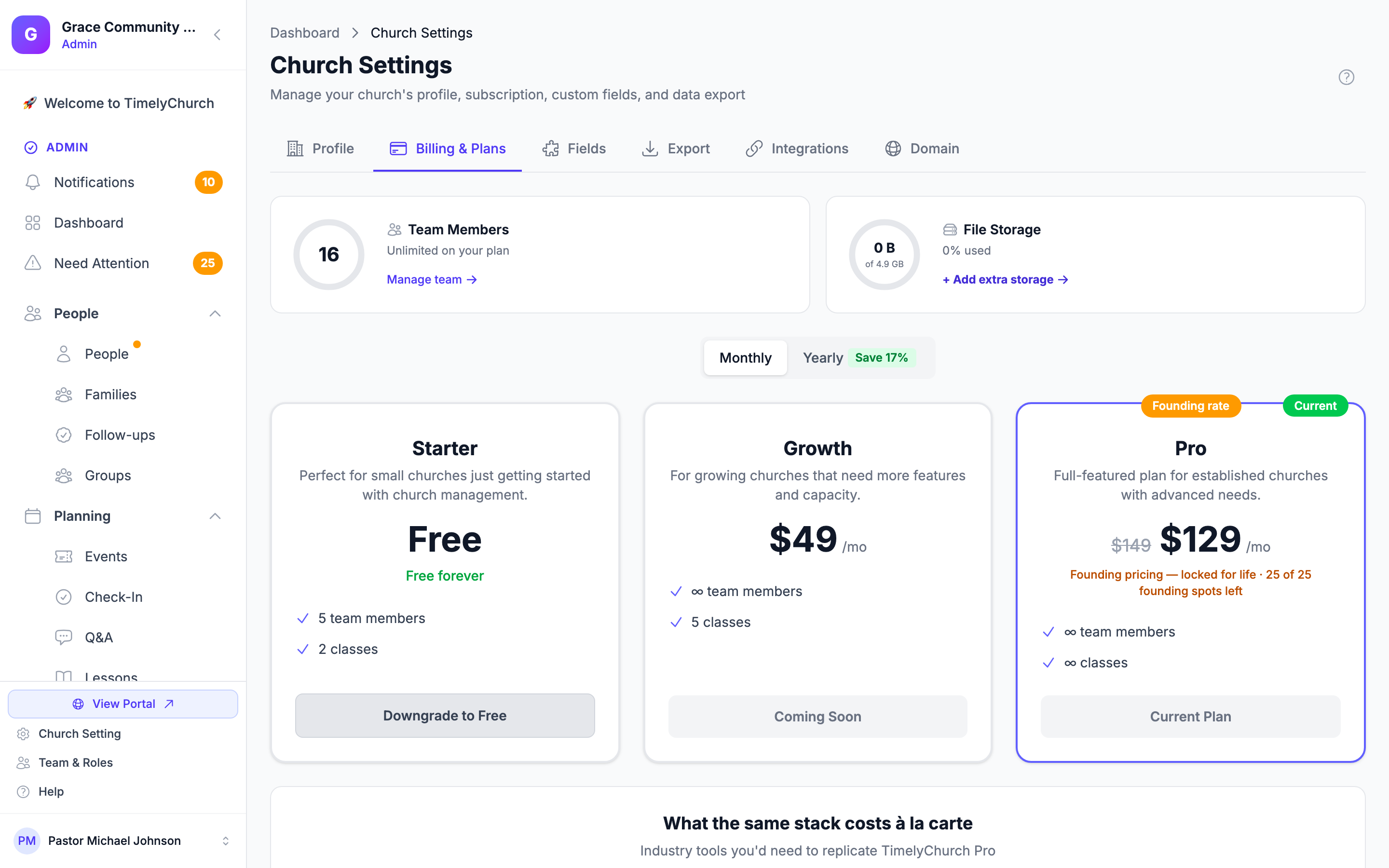
Founding pricing on Pro: The first 25 churches to subscribe to Pro lock in the $129/month founding rate for life -- it never goes up, even after the list price takes over. Once those 25 founding spots are filled, new Pro subscriptions are billed at the $149/month list price. While founding spots remain, the Pro card on Billing & Plans shows a Founding rate badge and how many founding spots are left. (Yearly Pro billing is $1,290/year -- about two months free versus paying monthly.)
Tip: If your church takes online donations, you need Pro. Online giving and the finance modules (Funds, Statements, Reports, Pledges, Budgets, Accounting) are all Pro features.
Running multiple campuses? TimelyChurch also offers Multi-Campus plans -- Multi-Campus 3 ($199/month) and Multi-Campus 5 ($249/month) -- which include everything in Pro plus the Association HQ area for overseeing several campuses from one place. These are set up with you personally (not through self-serve checkout) -- contact us to get started.
Sending Bulk Email
Emailing many people at once -- email campaigns, email automations, and emails to a whole group or event -- needs a paid plan. On a trial, the Email Campaigns page shows "Sending requires a paid plan", and the Send Now button stays unavailable while Edit and Duplicate keep working.
On a paid plan:
- There is a daily limit that counts people, not messages. One email to 400 members counts as 400. Growth allows up to 500 people a day and Pro up to 1,500. If a send would go over what is left for the day, TimelyChurch tells you before sending: "This send would pass your plan's daily email limit…" -- send to fewer people, or send the rest tomorrow.
- Some messages get a quick review before they go out. A church's first large send after it starts paying, and any message that looks like phishing, can be held for review. You'll see "Your message is being reviewed — usually within an hour. Nothing has been sent." Your message stays exactly as you wrote it and goes out as soon as it is approved. If you'd rather not wait, click Withdraw this message.
An ordinary newsletter with links to your website, video channel or a sign-up sheet goes out as usual. If a limit gets in the way of something legitimate, contact support.
How to Upgrade
You can upgrade at any time -- during the trial, after it ends, or anytime later.
- Click Church Setting at the bottom of the sidebar (or open your account menu and click Manage subscription →).
- Click the Billing & Plans tab. (Only church administrators see this tab.)
- You'll see your current plan, all available plans side-by-side, and a Monthly / Yearly toggle. Switching to Yearly shows a Save 17% badge.
- Click the button on the plan you want:
- During the trial, the Pro card shows Lock In Pro — $129/mo (or the yearly price when Yearly is selected).
- On another plan, a higher plan shows Upgrade — $…/mo, and a lower plan shows Downgrade to … (you'll be asked to confirm).
- You're taken to a secure Stripe checkout page to enter payment details. International churches (UK/EU/AU) may also be asked for a VAT/GST number.
- Confirm payment.
Your new plan activates immediately. Any features that were locked open up the moment payment succeeds.
Downgrades and Cancellations
You can change or cancel your plan from the same Billing & Plans tab -- Manage Billing opens the Stripe billing portal, where you can update your card, change plan, or cancel. Downgrades take effect at the end of your current billing period (so you keep what you paid for), and plan switches are prorated automatically.
If you cancel, you keep every paid feature until the end of the period you already paid for; the tab shows "Your subscription is set to cancel" with the date, and a Resume your subscription link if you change your mind. After that date, your data stays in place, but the admin area works the same way as after an ended trial: only the Dashboard and Church Setting open until you subscribe again.
Frequently Asked Questions
Can my church use the free Starter plan? Starter is shown on Billing & Plans as a free plan. A church whose trial has ended or whose subscription has been cancelled keeps all its data, but the admin pages other than the Dashboard and Church Setting ask you to subscribe. If you would like to talk about which plan fits your church, contact support.
Do I lose anything if I downgrade after upgrading? No data is deleted by a plan change. If you are over a limit of the new plan, your existing records stay; you just can't add new ones until you trim back or upgrade again.
How do the founding Pro spots work? The first 25 churches to subscribe to Pro lock the $129/month founding rate for life. After those 25 spots are claimed, new Pro subscriptions are billed at the $149/month list price. If you're already on the founding rate, it stays at $129/month for as long as you keep your subscription -- it never increases to the list price.
Can I get a refund? Refunds are handled case-by-case -- contact [email protected]. (Cancelling keeps your access until the end of the period you already paid for; the unused part of a yearly plan is not refunded automatically.)
What payment methods are supported? Credit and debit cards, through Stripe.
Can I switch between monthly and yearly? Yes -- use Manage Billing on your Billing & Plans tab. Switching plans or cycles mid-term is prorated.
My church is on a tight budget -- any discounts? Contact support if you are a small church, a church plant in your first year, or a church outside the US in a region with currency hardship. We'll talk it through with you.