
Website Studio Overview
Website Studio is TimelyChurch's built-in website builder that lets you create a professional, mobile-friendly church website without any coding. Your website pulls live data directly from your TimelyChurch account -- events, service times, staff, groups, sermons, and more -- so your site always stays up to date.
What You Can Do with Website Studio
- Build pages using a section-based page builder
- Choose from 10 professionally designed themes and customize colors and fonts to match your brand
- Display live church data such as upcoming events, service times, staff directory, groups, sermons, and prayer requests
- Manage your site navigation, header, and footer layout
- Optimize for search engines with built-in SEO tools, structured data, and analytics integration
- Upload and organize media in a built-in media library
- Connect a custom domain so visitors see your own web address (Pro plan)
How Website Studio Connects to Your Church Data
One of the most powerful aspects of Website Studio is that dynamic sections pull content directly from the rest of your TimelyChurch account. When you add a section like "Events" or "Staff Directory" to a page, it automatically displays the latest information from the corresponding module. There is no need to duplicate content.
Data sources that connect to your website:
| Website Section | Data Source |
|---|---|
| Service Times | Your configured service schedule |
| Staff Directory | Staff members you add in Website Studio |
| Events | Upcoming events from the Events module |
| Groups | Active groups from the Groups module |
| Announcements | Recent announcements |
| Sermons | Latest sermon and sermon archive from the Sermons module |
| Prayer Wall | Public prayer requests |
| Giving | Your church's online giving page |
| Contact Form | Built-in contact form or forms from the Forms module |
Accessing Website Studio
- Log in to your TimelyChurch admin panel.
- In the left sidebar, click Website.
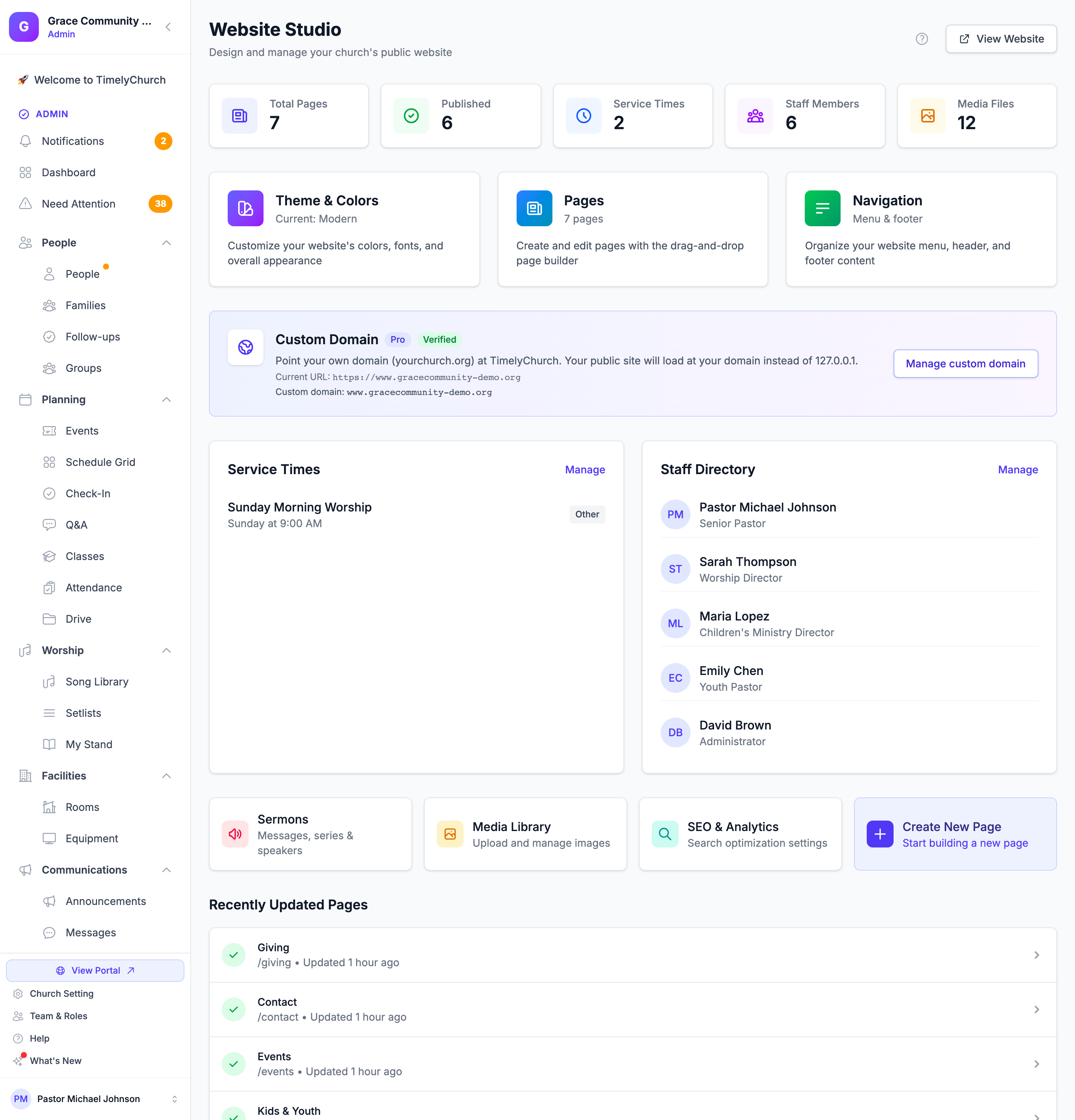
- You will see the Website Studio dashboard showing quick stats, quick actions, and recently updated pages.
If your plan does not include the website builder, the Website item shows a lock and an upgrade prompt instead.
The Website Studio Dashboard
The dashboard gives you an at-a-glance overview of your website:
- Total Pages -- The number of pages you have created
- Published -- How many pages are currently live
- Service Times -- Active service times configured
- Staff Members -- Active staff entries
- Media Files -- Files uploaded to your media library
Quick Actions
From the dashboard you can quickly access:
- Theme & Colors -- Customize your website appearance
- Pages -- Create and manage website pages
- Navigation -- Set up your site menu and footer
- Service Times -- Manage your service schedule (the same data that powers the Service Times website section and your SEO structured data)
- Staff Directory -- Add, edit, and arrange the staff and leadership shown on your site
Custom Domain
The Custom Domain card (marked Pro) shows your current web address and, once added, your custom domain with a Verified or Pending verification badge. Click Set up custom domain (or Manage custom domain) to go to the Domain settings. On other plans the card offers Upgrade to Pro. See Custom Domains and Subdomains.
Additional Tools
- Sermons -- Manage messages, series, and speakers
- Media Library -- Upload and manage images and files
- SEO & Analytics -- Configure search engine optimization and tracking
- Create New Page -- Start building a new page immediately
At the bottom, Recently Updated Pages lists the pages changed most recently, so you can jump back into your work.
Viewing Your Live Website
Click the View Website button in the upper right corner of the Website Studio dashboard to open your public website in a new tab. Your website is reachable at:
- Your church web address -- the address TimelyChurch gives your church, ending in
/c/and your church's short name. You can see, copy and change it in Church Settings → Profile (see Your Church Web Address). - Your custom domain (Pro plan) -- for example
www.yourchurch.com, once connected and verified.
Tip: Only published pages are visible to the public. Draft pages are only visible to admins through the admin panel.
Plans and Permissions
- Plans: Website Studio is part of the Growth and Pro plans. The number of pages is capped on Growth -- when you reach the cap you see "You've reached the maximum of … website pages on your current plan." Custom domains are part of the Pro plan.
- Permissions: In a role's settings, the website is the Website CMS module. View access lets someone look around Website Studio; create and edit access lets them build and change pages, sections, navigation, media, staff and service times. Publishing or unpublishing a page and deleting pages need the highest level of access -- a role without it can save drafts and sees "Publishing a page needs Manage access in Website. Ask your church administrator if you need it." when it tries.
Next Steps
- Creating Pages -- Learn how to add and configure new pages
- Website Sections -- Explore the available section types
- Customizing Design -- Set your theme, colors, and fonts
- Custom Domains and Subdomains -- Connect your own domain