
Group Meetings, Attendance & RSVPs
Private and Public groups can log each meeting with a per-member attendance list and, when a group asks for RSVPs, collect each member's answer ahead of time. Here is how leaders and members work with both.
How It Fits Together
There are three pieces to this feature:
- Meetings: one record per meeting (date, optional topic, optional notes).
- Attendance: who was there, marked when the meeting is recorded.
- RSVPs: each member's answer ahead of the meeting: Going, Maybe, or Can't go.
A meeting can have both RSVPs (collected before the meeting) and attendance (recorded afterwards). They are independent. A member can answer "Going" and still not be marked present.
Recording a Meeting (Leader / Admin)
On the group page, open the Meetings tab. Under Record a Meeting, fill in:
| Field | Required | Notes |
|---|---|---|
| Date | Yes | Today's date is filled in for you |
| The list of members | No | Tap Present or Absent for each member. Mark all present and Mark all absent set everyone at once. The line underneath counts how many are present, absent, and not marked. With more than 8 members, a Search... box appears above the list |
| Topic (optional) | No | Free text, e.g. "Chapter 5 Discussion" |
| Notes (optional) | No | Free text |
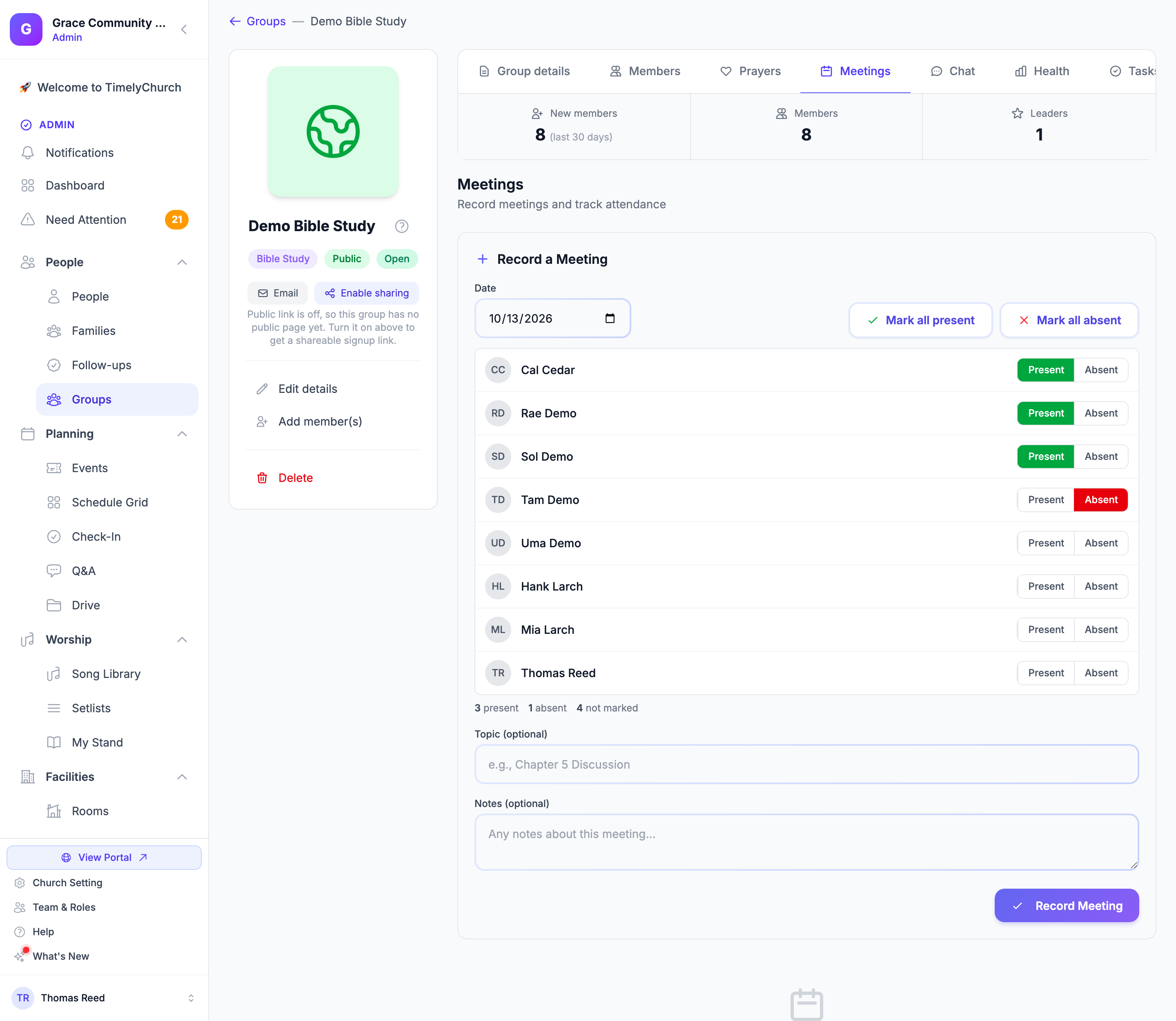
Click Record Meeting. Nothing is saved until you do. The meeting's attendance count is the number of members you marked Present. The meeting's time and room are taken from the group's own meeting details.
Meeting History
Recorded meetings are listed under Meeting History, newest first. Each entry shows the date, how many attended, the topic and notes, and, when RSVPs are on, how many answered Yes, No, and Maybe.
Click Details to see the Attendance Detail for that meeting: each member, and whether they were present.
RSVP Responses
When the group has Ask for RSVPs turned on (on the group's Group details tab: "Members will be prompted to respond to upcoming meetings"), members can answer for each upcoming meeting:
| Answer | Shown to leaders as |
|---|---|
| Going | Yes |
| Maybe | Maybe |
| Can't go | No |
Member-Side RSVP from the Portal
Members RSVP for themselves from the group's page in the member portal. The Overview tab shows an Upcoming meetings card with the next meetings from today onward. Each meeting has Going, Maybe and Can't go buttons, the member's current answer, and a count of each answer ("Going: 4 · Maybe: 1 · Can't go: 2"). Without Ask for RSVPs, the card does not appear.
Upcoming meetings are the meetings on the Meetings tab dated today or later. To collect RSVPs for a meeting, record it ahead of time with its future date.
RSVP Summary
In Meeting History, each meeting shows a tally of how many members answered yes, no, and maybe, so you can see how many people have committed.
Attendance vs. RSVP — When to Use Which
| Question | Use |
|---|---|
| "How many people are coming on Tuesday?" | RSVP summary |
| "How many people actually showed up?" | Attendance |
| "Who has missed 3+ meetings in a row?" | Attendance (drives the consecutive-absences list on the Health tab) |
The Health tab uses attendance (not RSVPs) when calculating consecutive absences and average attendance percentage.
Class Attendance — A Different Path
A class has no Meetings tab. Teachers take attendance on the class's Attendance tab, under Take attendance, and a child who has checked in through Check-In shows a Checked In badge there. See Taking Class Attendance, and Group Reports and Health Metrics for the class attendance report.
Deleting a Meeting
Click the trash icon next to a meeting in Meeting History, then Delete. Deleting a meeting also removes its attendance and RSVP records. Your role needs permission to delete in Groups to do this.
Tip: Mark attendance every time you record a meeting, even when turnout is low. Per-member attendance drives the consecutive-absences list, the attendance trend, and the health score.